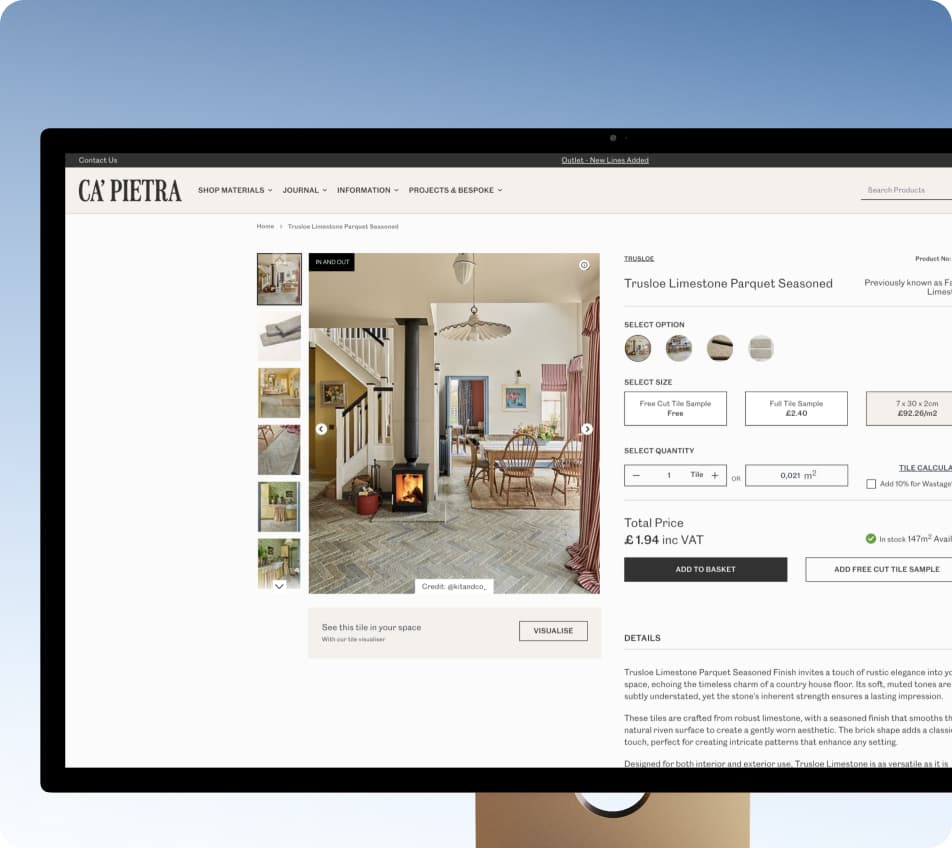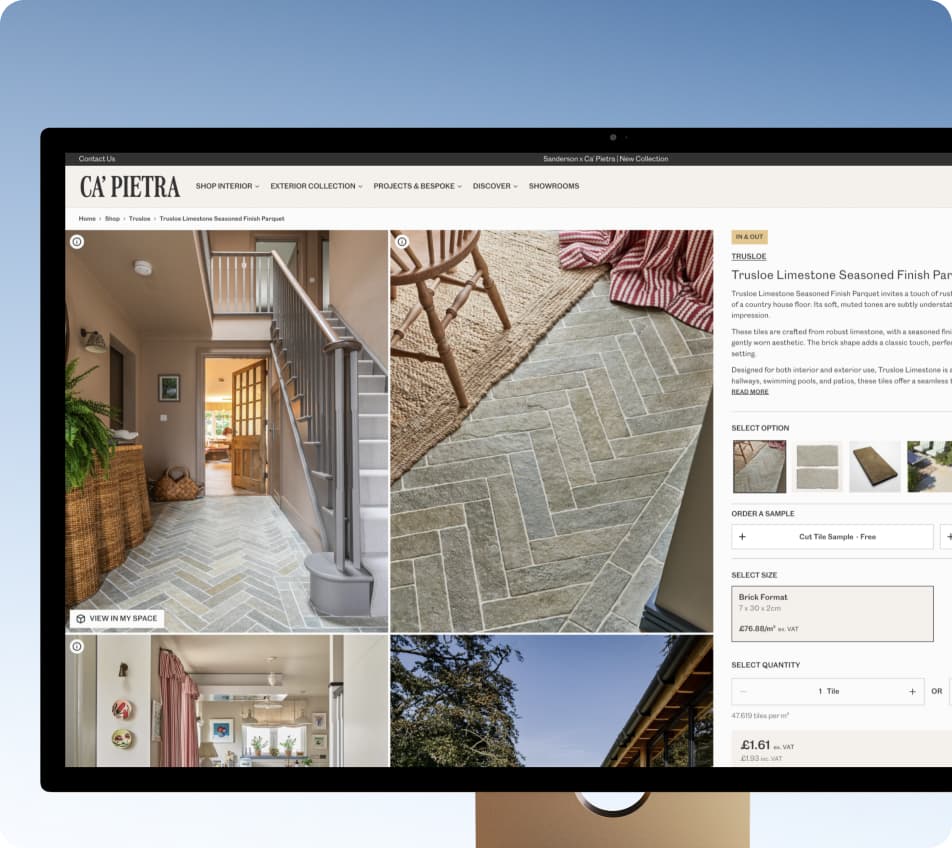
Ca'Pietra: From Magento to Shopify Plus - Retail and a Native B2B Portal in One Store

We migrated Ca'Pietra’s B2C store and B2B portal from Magento to Shopify Plus, using native Shopify features and apps for trade workflows. B2C launched on time and budget; the trade portal followed one month later.

Founder jack avatar

Reviewed by: Jack Ananchenko, Co-founder, CEO

Feb 19, 20265 min read
page_1

Ca'Pietra, United Kingdom

Retail & E-commerce, Home Improvement / Building Materials, B2B / Wholesale

The Essentials

Magento to Shopify Plus Migration

Shopify Plus Development

Native Shopify B2B Trade Portal Development

Shopify Integration

PM + 7 people: development, QA, design

B2C launched on the planned date - 0 days of delay

Tech Stack

Shopify PlusLiquidShopify FunctionsCheckout UI ExtensionsCustomer Account ExtensionsNetSuiteHubSpot

What We Had Before the Migration: Magento, NetSuite, and Trade Logic in Custom Modules

Ca'Pietra has been selling natural stone and tiles since 1989 - originally as Artisans of Devizes - and operates several showrooms across the UK. There are two groups of customers, and they behave very differently. Retail customers choose materials for a specific renovation project and calculate the quantity needed for a particular space.

Trade customers - architects, designers, contractors, and landscape professionals - order regularly, at their own prices and on agreed terms, through a separate Trade Service. At the time of the migration, the database contained 101,412 registered customers.

The retail store and trade portal ran on Magento, tightly integrated with NetSuite. Prices, credit limits, and order data came from the ERP, while marketing and most forms were handled through HubSpot.

The trade side relied on extensive custom development: company-level pricing, credit limits, order approvals - all of it was handled by custom modules that someone had to maintain. And there is an important nuance here: it worked. The problem was not that things were broken, but the cost of making changes.

Every adjustment to the trade logic meant working with custom modules - a slow and expensive process with the risk of affecting something else. This defined the project objective: migrate the store from Magento to Shopify Plus, bring retail and trade together in one place using native B2B capabilities, and reduce reliance on custom Magento modules.

Why Tiles Are Difficult to Sell Online

There is another factor that cannot be ignored in a project like this - the nature of the product itself. Tiles are not sold “by the piece” in the way a typical online store understands it:

  • Three units for one SKU. The same product can be sold by square metre, box, or piece, depending on the item and the customer.

  • Cutting waste. A customer does not simply need “10 m²” of tiles, but a specific number of boxes with extra material allowed for cuts.

  • Grout is calculated separately. The number of bags depends on the tile size and the width and depth of the joints, rather than just the surface area.

On Magento, all of this was handled by custom calculators. Any migration had to replicate them - otherwise, customers would not be able to correctly calculate and order part of the catalogue.

The Key Points in Ten Seconds

0

Days of delay

SKU-level analytics made it clear which categories were worth promoting.

0%

Budget overrun

The project stayed within the original budget, including all additional requirements that emerged during the work.

101,412

Accounts

The catalogue, accounts, and orders were migrated, with redirects configured for changed URLs to preserve SEO.

The Challenge: Native Shopify B2B Instead of a Custom Magento Portal

The task in one sentence: replace a heavily customized trade portal with a modern platform while preserving the key functionality used by trade customers. The complexity was not in migrating the catalogue itself, but in the constraints within which the migration had to be carried out. The main requirement came from the client right away: no external backend and no custom hosting.

We did not challenge it - it made sense for a company looking to reduce its reliance on custom modules. But it meant that every trade feature had to be built using the platform’s native capabilities or accepted as something that would not be available.

The Constraints We Worked Within

  • No custom backend. We could write code, but it had to live within the platform: Shopify Functions, Checkout UI Extensions, and Customer Account Extensions.

  • Two roles instead of a permissions matrix. Native Shopify B2B supports only Location Admin and Ordering Only. All access permissions within a trade account had to fit into these two roles, with no options in between.

  • A third-party NetSuite connector. The integration was managed by a separate agency, and we could neither modify nor extend it. The storefront could work only with the data NetSuite already passed to Shopify, so “have the ERP send one more field” meant adding a task to someone else’s backlog.

  • The cost of a migration error. Trade customers order regularly and on credit terms, while quantities and totals from every order go directly into NetSuite - calculations in the store had to match what the ERP expected. On top of that, years of organic traffic could not be lost during the platform migration.

Why Native B2B Is Not Just a Matter of “Turning It On”

Shopify Plus has its own B2B functionality, but there is a significant gap between “the functionality exists” and “it replicates what worked on Magento.” Three things made that gap particularly wide:

There is no out-of-the-box equivalent for the trade logic

Company hierarchies, tiered pricing, PO checkout, and credit limits were built using Shopify’s native B2B features plus compatible apps.

One theme for two audiences

Retail and trade share one store and theme but require separate content, pricing, and navigation. Every new section raises the question: “What does the other audience see?”

A broad integration landscape without an orchestrator

NetSuite, HubSpot, Roomvo, several B2B apps - and no custom service where they could be connected in one place and the sequence of events managed.

The Solution: Two Migration Tracks - Dawn for Retail, Native B2B for Trade

Shopify Plus development ran along two parallel tracks. The retail storefront was built on a customized Dawn theme. The trade portal was built on native Shopify B2B: Companies, Locations, and Price Lists, plus Customer Account Extensions and a small, deliberately limited set of specialized apps.

The temptation here was obvious: a small custom service would have provided more flexibility - a custom role model, custom pricing logic, and custom approval statuses. But it would also have become another layer that needed to be hosted, updated, and eventually handed over for ongoing support. In other words, the same problem on a different platform. So we broke the trade flow down into individual mechanics and looked for a native equivalent for each one.

Where the platform did not provide the required functionality, we filled the gaps with targeted apps. Replacing an app is not free either - data has to be migrated and integrations adapted - but it does not add custom server-side code.

Instead of an orchestrator, native mechanisms serve as the connecting layer: metafields and metaobjects for data and configuration, Shopify Flow for automations, and extensions for specific business logic.

What We Used to Build the Trade Portal

  • Quantity calculators. The customer enters the area and gets the exact quantity they need, with an allowance for cutting waste. Grout has a separate calculator with its own logic.

  • Quick Order. A theme section for repeat orders: SKU search, bulk CSV upload, and square-metre calculations directly in the table. The section was designed to be reusable across different pages.

  • PO number at checkout. A Checkout UI Extension lets trade customers enter their purchase order number without leaving the standard Shopify flow, and the number is passed along with the order.

  • Payment method availability rules. Payment method visibility is controlled through Payment Customization - the same Shopify Functions mechanism used by the HidePay app. At checkout, a trade account sees only the payment methods available to that specific account.

  • Self-service team management. The role model remained native, with two roles, but BlueBolt allows trade accounts to add and deactivate their own users directly in Shopify Customer Accounts, without contacting support.

  • Quote requests. The “request → quote → order” flow runs through the BSS B2B Quote app instead of email correspondence.

  • Trade Dashboard. Credit limit, individual discount, and total spend are displayed directly in the account. The data comes from NetSuite.

The Retail Side: Roomvo and HubSpot in the Integration Landscape

For retail, the main story is different - customers need to see what the material will look like in their own home before calculating the required area. Roomvo serves this purpose: a visualizer that shows tiles in an interior.

HubSpot remained part of the store’s integration landscape: it handles forms (alongside Shopify Forms), transactional emails, and data synchronization. The migration did not require moving the marketing stack.

Technical Details: Tile Pricing, m² Calculations, and the Limits of Native B2B

Why “Price × Quantity” Does Not Match NetSuite Down to the Penny

We initially implemented the pricing logic in a straightforward way: unit price multiplied by quantity. For a standard catalogue, that is enough. But for products where quantities are converted between square metres, boxes, and individual pieces, each step introduces its own rounding.

During integration testing, we found that these conversions could cause the line total to differ from what NetSuite expected - by a few pence. For a store where order totals are passed to the ERP, that difference is not cosmetic: the calculations in Shopify and NetSuite have to match.

The correct approach is to calculate not “bottom-up,” but from the final total: first determine the amount the ERP should receive, then work backwards to distribute the prices across the line items. Shopify requires two mechanisms for this: Cart Transform handles the structure and pricing of line items in the cart, while Discount Function brings the final total to the expected value.

We deliberately did not include the full calculation rebuild in the release: this was a change that needed to be tested across the entire catalogue and all account types, while the launch date was fixed. So it became a separate high-priority phase immediately after the main release - ahead of any new features.

Three Trade Prices: Ex. VAT, Inc. VAT, and RRP on One Page

Trade customers need to see prices in three formats: excluding VAT, including VAT, and the recommended retail price. At first glance, this looks like half a day of Liquid work.

But this is where a platform-specific nuance appeared: for an authenticated B2B customer, variant.price already returns the contextual B2B price. The retail price is simply not available in the template, so there is nowhere to retrieve it from.

The solution was to store the RRP in a variant metafield, while the switcher moves between three sources: the metafield for the recommended retail price, the “live” price for Ex. VAT, and that same price plus 20% for Inc. VAT.

Importantly, this is a display switcher used in the catalogue and on the product page. The final tax amount is calculated by Shopify’s native engine at checkout, so the indicative price shown on the page and the checkout total can differ by a penny due to different rounding rules.

The second nuance came from the layout: due to the customization limitations of the account component at the time of development, the switcher could not be placed in the required position inside <shopify-account>, so it was moved into the header as a separate element.

Order Approvals: Draft Orders Plus Payment Rules

Order approval is a typical B2B mechanism that would normally require a custom service for managing statuses. Here, it is built from two native components.

Payment Customization adds an approval requirement based on predefined rules. The customer submits the order for approval, Shopify creates it as a draft, and the seller’s team confirms it.

Separate rules determine which payment methods are available at this stage. There is no custom state database and no worker - both parts are handled by platform-native mechanisms.

Two Modules We Had to Build Ourselves

  • Tile calculator. The area and tile dimensions are converted into the required quantity with an allowance for waste, and then into the sales unit for the specific product: m², boxes, or individual pieces. The formula is the same across the entire catalogue, but behaves differently because all input values - dimensions, quantity per box, and waste percentage - are stored in product metafields.

  • Grout calculator. Calculates the number of bags based on tile dimensions and joint width and depth. The logic differs from the tile calculator: here, area is not the main variable - joint geometry is.

    A one-time migration script stands apart from the rest. We migrated the catalogue, customers, and orders using Matrixify, but B2B entities are not included in the standard Magento export.

We collected companies, locations, and contacts from Magento and CSV files, mapped them to native Companies and Locations, and imported them with a script via the Admin API. The script ran once - from that point on, the client manages this data directly in the admin.

The Most Challenging Part of the Project

The hardest part was not any single piece of code, but the fact that all the mechanics had to coexist within the same checkout and the same account.

Each works on its own: payment rules, the PO field, quotes, and team management. Together, they share the same checkout, so every new rule had to be tested against all the other scenarios.

The second source of complexity was the pace of another team. The NetSuite connector is managed by a separate agency, so any change to data we were missing depended on their releases rather than our sprint.

Before
After

Stack

Platform and native capabilities: Shopify Plus, Liquid, Shopify Functions, Checkout UI Extensions, Customer Account Extensions, Metaobjects and metafields, Shopify Forms, Shopify Flow, Shopify Search & Discovery.

Apps: Matrixify, HidePay, BlueBolt B2B Company Controls, BSS B2B Quote.

Integrations: NetSuite, HubSpot, Roomvo, Google Tag Manager.

What Went Live and What It Delivered

Business Results

The B2C store launched on the planned date and within budget - including all additional requirements that emerged during the project. The trade portal followed as the second phase approximately one month later.

This was the result of prioritization: anything that could be completed after launch was deliberately kept out of the initial release.

  • No custom backend to maintain. There is no proprietary server infrastructure to maintain: instead of self-hosted Magento and custom B2B modules, the solution runs on Shopify’s managed infrastructure and several specialized apps.

  • Day-to-day changes without a developer. The client’s team manages content, merchandising, and calculator settings themselves through the theme customizer, metafields, and metaobjects.

  • Changes go live without Magento module releases. New improvements follow a dev theme → QA → live workflow as theme updates or Shopify extensions.

Results for Trade Customers

Previously, some trade operations went through an account manager - by email or phone. Customers can now handle them themselves: quotes, availability checks, repeat orders, and management of their own teams.

Trade pricing is applied automatically, while the PO number is entered directly in the standard Shopify checkout - there is no need to leave the normal flow or duplicate anything by email.

Reliability and Post-Launch Changes

The store runs on Shopify Plus’s managed infrastructure, so the client does not need to scale or maintain servers themselves.

The trade logic lives in Shopify Functions and Checkout / Customer Account Extensions. These are versioned and deployed using Shopify’s tooling, making changes controlled and reversible.

We safeguarded the migration in two ways: with a set of redirects for changed URLs to preserve the SEO structure, and by validating the entire purchase journey together with the client during the release - from catalogue to payment. The work then continued through post-launch phases, with the pricing calculation rebuild first in line.

  • linkedin
  • x
  • facebook
  • Clutch
  • Upwork
  • Reddit

Planning a Magento to Shopify Plus Migration with a B2B Portal?

We migrate retail and B2B operations to Shopify Plus, preserving key trade features like pricing, approvals, PO checkout, and calculators while using native Shopify capabilities where possible.


Jack ananchenko

Jack Ananchenko

CEO and Co-founder

Vladimir gubarev

Vladimir Gubarev

COO and Co-founder

By submitting this form, you agree to our Privacy Policy and Terms Conditions.

See What Else We've Built