
From Google Sheets to a Custom Shopify App: Automating Revenue Forecasting for eCommerce Merchants

How Stellar Soft transformed a spreadsheet-based forecasting process into an automated Shopify app with a dashboard, notifications, and autoscaling.

Founder jack avatar

Reviewed by: Jack Ananchenko, Co-founder, CTO

Aug 4, 20265 min read
From Google Sheets to a Custom Shopify App: Automating Revenue Forecasting for eCommerce Merchants

Custom Shopify App for Revenue Forecasting

Custom Shopify app replacing a Google Sheets-based forecasting workflow with automated order imports, an interactive dashboard, and alerts. See how!

The Essentials

Company developing solutions for e-commerce

Shopify app for automated sales forecasting

Order imports, forecasts, dashboards, and alerts

Tech Stack

LaravelPHPNode.jsNginxMySQL / PostgreSQLRedis

From spreadsheets to a full-fledged product

The client developed a forecasting concept for e-commerce store owners who wanted to understand how their projected revenue could change over a selected period, from a day or a week to a month or a year. The concept had already been tested using real store data.

The initial process relied on Google Sheets and custom scripts. The scripts pulled data from the stores and performed the necessary data processing and calculations directly in spreadsheets containing thousands of rows. At the same time, the team had to manually configure and maintain many of these scripts.

This approach validated the idea but could not support a scalable product inside Shopify. The client therefore needed to turn the concept into an automated app for merchants.

From Google Sheets to a user-friendly product for merchants

Automated data processing

Importing orders from the previous year and performing calculations without Google Sheets.

Interactive dashboard

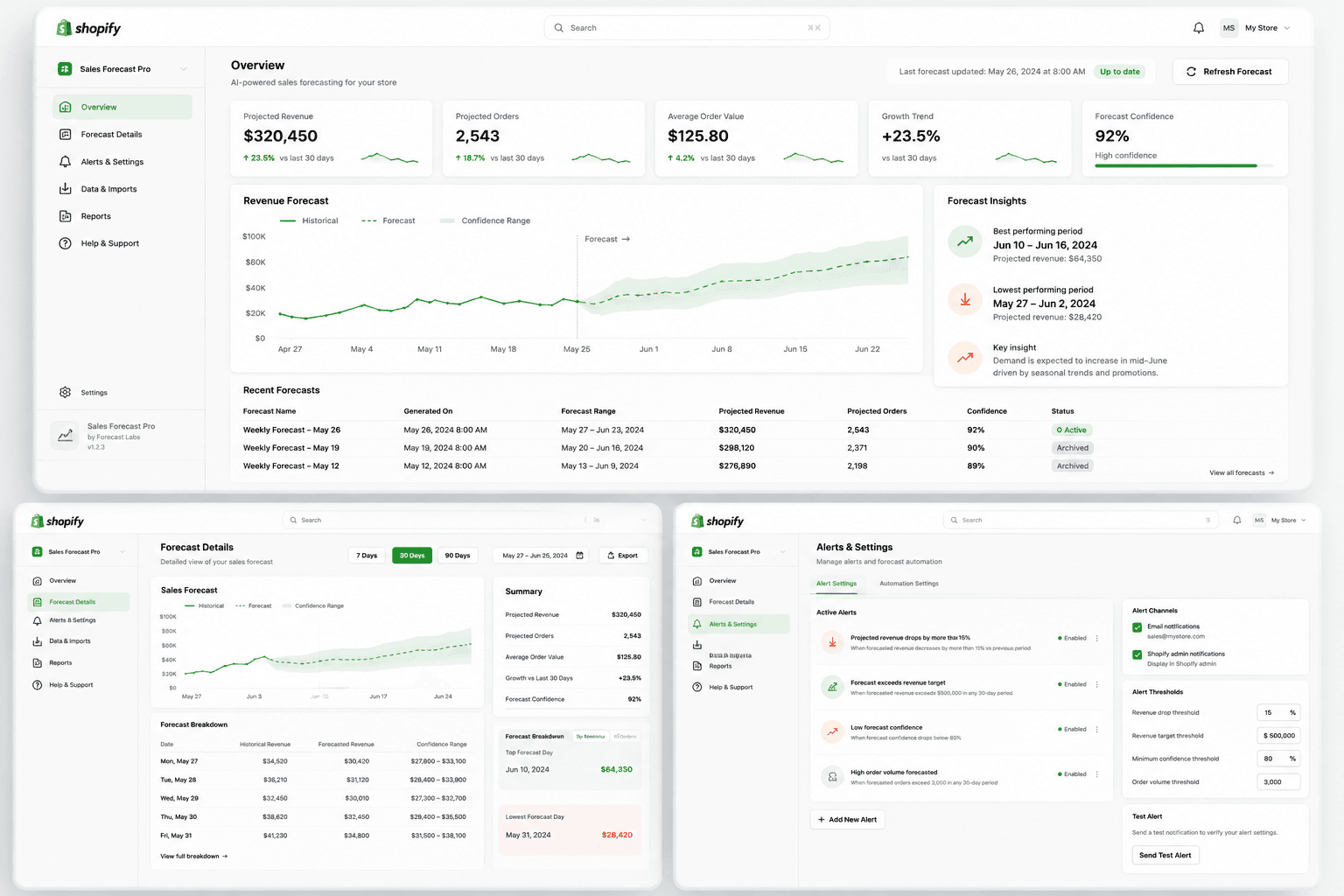
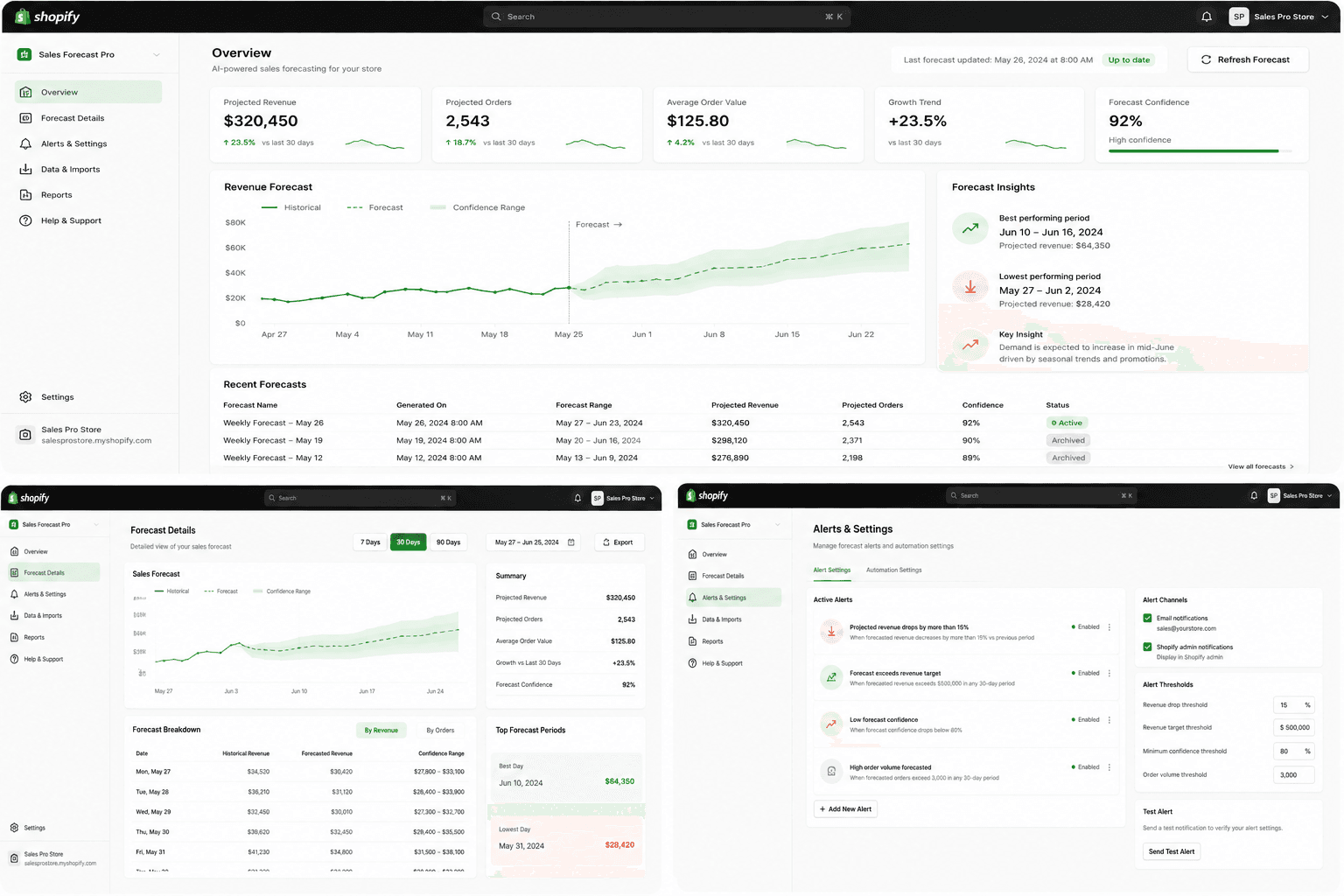
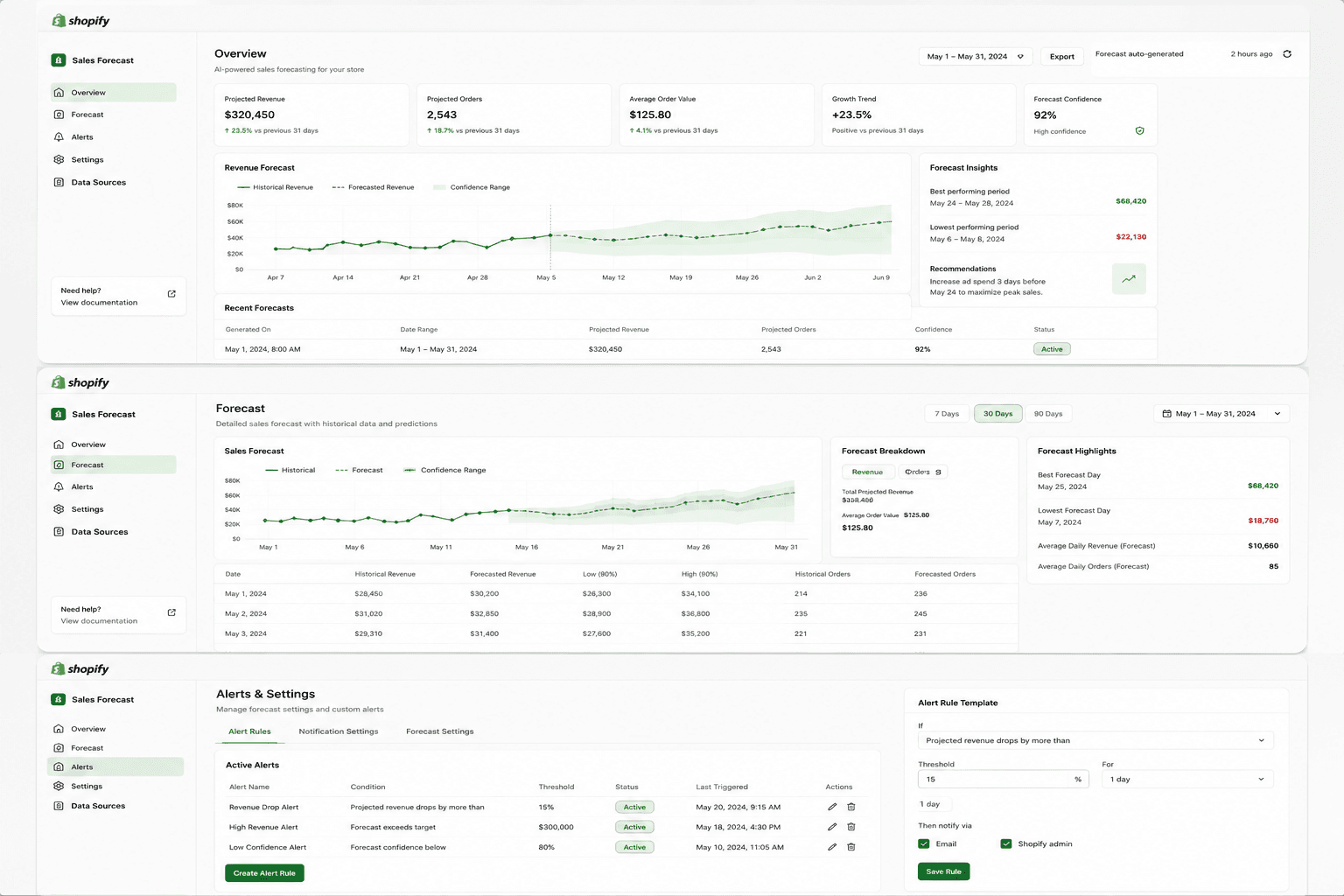
Analyzing sales and forecasted revenue on a single page.

Autoscaling

Stable performance when connecting stores and updating metrics without using unnecessary resources during periods of low load.

From PoC to a Shopify product: 3 technical challenges

The task was to transfer the existing logic from Google Sheets into a Shopify product with automated calculations, a dashboard, and stable performance.

Manual work with scripts

The process relied on Google Sheets and custom scripts that were manually configured to work with store data.

Calculation logic

The client’s formulas were transferred into code without changing the underlying logic, and the calculations were tested on large volumes of data.

Server load spikes

Importing a year’s worth of data and updating the metric every minute overloaded the server, so autoscaling was implemented.

A direct path from store data to revenue forecasts

Stellar Soft transformed the spreadsheet-based process into a custom Shopify app.

Once a store is connected, the app automatically imports the necessary order data and performs the forecast calculations. The results are displayed in an embedded dashboard with interactive charts, allowing merchants to compare current sales with historical data and track changes in forecasted revenue.

The team also added a notification system with flexible settings. Merchants can choose to receive notifications via email, Slack, or WhatsApp if a selected metric changes by a specified percentage and that change persists for a set period.

To support resource-intensive operations, including historical data imports and frequent metric updates, the team set up autoscaling infrastructure using Terraform and Terragrunt. During periods of increased load, the system could launch additional server instances and shut them down once the load returned to normal.

How we validated the logic and stabilized the app

1. Engineering approach

Initial approach

At first, the app ran on a standard server configuration. However, this approach proved insufficient for the load generated when new stores were connected.

Importing order history for the previous year created a significant temporary load. At the same time, one of the app’s key metrics had to be updated every minute. The team therefore needed to test the infrastructure under conditions that significantly exceeded the app’s standard operating load.

Testing the calculation logic

The team needed to verify that the logic of the mathematical formulas had not changed when they were transferred into code. To achieve this, the team simulated large volumes of sales data and manually verified the accuracy of the calculations.

This approach made it possible to confirm that the results matched the original formula logic while also testing whether the infrastructure could reliably handle the required load.

Final approach

After the initial server architecture failed the load tests, the team implemented autoscaling using Terraform and Terragrunt.

The infrastructure could launch additional instances as the load increased and shut them down once the system stabilized. This allowed the app to handle resource-intensive operations without keeping additional server capacity running continuously.

2. Custom solutions

The solution was developed as a fully custom Shopify app based on the client’s existing forecasting logic.

The team implemented functionality for:

  • Importing order data from connected Shopify stores;

  • Retrieving sales history for the previous year during onboarding;

  • Processing the data required for revenue forecasting;

  • Transferring the client’s custom mathematical formulas into code;

  • Regularly updating selected dashboard metrics;

  • Displaying forecasts and sales trends within the embedded Shopify interface;

  • Applying notification rules based on percentage changes and how long those changes persist;

  • Sending notifications via email, Slack, and WhatsApp.

Shopify Polaris components were used for the app’s embedded interface. The data-processing and forecasting logic, dashboard functionality, and notification system were developed specifically for this solution.

3. Architecture: before and after

Before: spreadsheet-based process

  1. Merchant’s Shopify store.

  2. Google Sheets.

  3. Custom scripts for retrieving and processing data.

  4. Manual script configuration and maintenance.

  5. Calculations and result verification in spreadsheets.

This process helped the client test the forecasting concept, but it required ongoing work with scripts and did not provide merchants with a complete product experience.

After: automated Shopify app

  1. Merchant’s Shopify store.

  2. Automatic import of store data.

  3. Laravel application.

  4. Forecasting and calculation logic.

  5. PostgreSQL and Redis.

  6. Embedded Shopify dashboard.

  7. Notifications via email, Slack, and WhatsApp.

The new system brought data collection and processing, result visualization, and notifications together into a single automated process.

4. Technology stack

  • PHP 8.3+ and Laravel – the foundation of the application and business logic.

  • Node.js – frontend asset management.

  • PostgreSQL – relational database.

  • Redis – caching and queue management.

  • Nginx – web server.

  • Supervisor – process management.

  • Certbot and Let’s Encrypt – SSL certificate configuration.

  • Terraform and Terragrunt – autoscaling infrastructure configuration.

  • Shopify Polaris – interface components for the embedded app.

From a spreadsheet-based PoC to an automated Shopify product

Technical results

  • Data processing: The Google Sheets-based workflow and manually configured scripts were replaced with automated Shopify order import and processing.

  • Forecasting: The client’s formulas were transferred into code without changing their logic, and the accuracy of the calculations was verified using large volumes of data.

  • User experience: Large spreadsheets with thousands of rows were replaced with a single-page dashboard featuring interactive charts.

  • Metric updates: Dashboard data is updated regularly, with the key metric refreshed once per minute.

  • Infrastructure: The initial fixed server configuration was supplemented with autoscaling to handle periods of increased load.

  • Notifications: Users can configure notifications via email, Slack, and WhatsApp based on specified percentage changes and how long those changes persist.

Business results

  • Merchants can see how each new sale affects forecasted revenue over a selected period.

  • Current results can be compared with sales from the same period in the past.

  • The app provides clearer data for deciding whether to increase advertising activity to drive sales or maintain a more moderate pace of operations.

  • The client moved from a spreadsheet-based proof of concept to a structured Shopify product with an automated workflow.

The main value of the project was not reducing infrastructure costs. Moving to a full-fledged app naturally required server infrastructure that had not been necessary for the initial Google Sheets-based process. Instead, the project created a more convenient product experience and eliminated the need to manually configure and maintain numerous scripts, which had been a limitation of the previous approach.

  • linkedin
  • x
  • facebook
  • Clutch
  • Upwork
  • Reddit

Is your product still running on spreadsheets and manual scripts?

We’ll turn your proven concept into a custom web or Shopify app with automated processes, dashboards, and infrastructure ready to handle real-world loads.


Professional man in a suit against a dark blue background.

Vladimir Gubarev

CEO and Co-founder

Portrait of a man with short hair wearing a blue button-up shirt against a dark background.

Jack Ananchenko

CТO and Co-founder

By submitting this form, you agree to our Privacy Policy and Terms Conditions.

See What Else We've Built