
Last Updated | June 4, 2026

For more than ten years there has been no argument at all; the hosted eCommerce king is Shopify without a doubt. It acts as the supporting framework for eCommerce companies by the hundreds of thousands.
The topic of possible migration to a new platform is up for discussion among the participants. Then the question arises, what is Shopify really and how does this all-in-one platform expect to handle the global complexity of selling to the consumer in 2026?
The present study closely examines the matter of migrating to Shopify, the associated costs, the various steps and the duration for store setup thus revealing the importance of having the correct foundation for annual profits being even more critical.
Why Businesses Are Moving to Shopify in 2026
Shopify progressively turned into the premier eCommerce platform for sellers who demand a combination of a non-flexible, scalable, and not-so-tech-friendly solution. Over 40% of all new merchants are using Shopify, and the company also wins a third of all migrations from the corporate section to its platform. While Shopify is ideal for brands seeking simplicity and speed, businesses that rely on flexibility, multi-store management, and deep customization often find Magento or Adobe Commerce a more future-ready foundation.
The perception of Shopify has completely changed from what it was a couple of years ago or similar to the complex platforms where managing everything was a must. The infrastructural part is taken care of by Shopify. By providing hosting, security, and support that is operational around the clock, Shopify has done away with most of the scaling limits that were imposed by the legacy systems. The app ecosystem, theme versatility, and third-party connectors make it possible to build anything you can imagine.
Shopify accompanies businesses in their growth with solutions at every stage from quicker site and checkout conversion to facilitating headless architecture and multi-market selling. If businesses want to get free from their technical debts and have a say in their client experience, moving to Shopify has become a strategic choice rather than a technical problem. Discover the reasons for the migration to Shopify in 2026.
Shopify Migration Step-by-Step Process
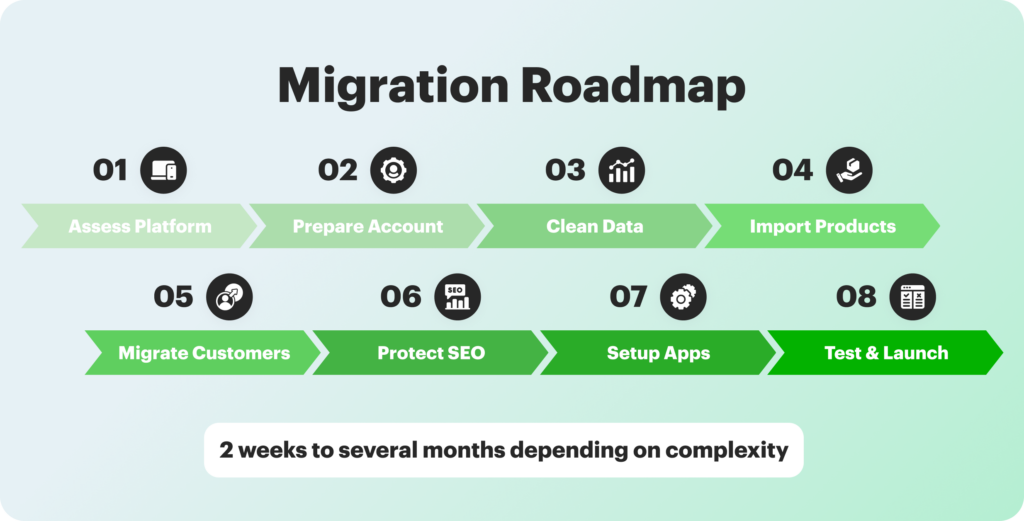
Migration between different platforms usually lasts for some 2 weeks up to several months which is determined by the complexity of the migration. Do not hurry it, as sauntered good things. The monthly fees from Shopify are just one part of the total costs you will incur, consider the migration tools, the designing work, the subscriptions, and perhaps the expert services. Your staff will need time to get used to Shopify’s interface and features. Thus, plan for training and adjustment periods to facilitate migration.
In fact, Shopify migration is not something that occurs once and then ignored. Your new webstore should be monitored and optimized regularly.
Assess Your Current Platform
Start by evaluating your current eCommerce platform from the technical and strategic aspects. Look into site performance, integrations, speed, and developers’ dependencies to locate the bottlenecks and recurring issues. Also evaluate the efficiency of the workflow and the limitations of the tools since these affect directly the feasibility and ROI of a Shopify transfer.
Analyze the customer experience, and in particular, the checkout process, mobile usability, and design flexibility. Look into the scaling requirements for large traffic and sales. This evaluation will help plan and also ensure that the Shopify adoption is in alignment with the company’s growth objectives.
Prepare Your Shopify Account
Select the appropriate Shopify plan (either Shopify or Shopify Plus) considering your site’s traffic, its complexity, and the functionalities you want to have. Set the basic configurations for the migration as per domains, business information, currencies, and tax defaults to have the systems synchronized first.
In case you are working with a migration partner, set up staging, template, and collaboration tools. Adequate account preparation not only eases the migration process but also minimizes the need to go backward, thus making it certain that the next import and configuration tasks are accomplished.
Clean and Export Your Data
Audit and clean up old product catalogs as well as order history. Old information will be cleansed of duplications and formatting errors to facilitate importing and to have data integrity in Shopify.
Core datasets, goods, customers, orders and content will be exported while taking care to keep key fields consistent. Any custom formats will be mapped to the Shopify structure with the use of tools. This step not only aims at improving data quality during its movement but also at making the business ready for operational efficiency.
Import Products and Collections
Importación de productos desde archivos CSV o API para catálogos enormes con características. Compruebe fotos, variantes, precio y metadatos después de la importación, luego use herramientas de edición masiva para arreglar rápidamente problemas.
Product collections migration by examining your category structure and mapping it to Shopify’s manual or automated collection logic. Keep SEO URLs with redirects and make sure that product collections are compatible with current buying trends and tagging standards.
Migrate Customers and Orders
Transfer and receive customer data including names, email addresses, purchase records, and marketing preferences. It is a must that passwords and credit cards that were used before are not included in the transfer thus making reactivation through branded invites and communication necessary. Bring in the past purchase records for analytical purposes but observe the limitation of managing live orders. If data migration needs to be maintained, think about the incorporation of the previous order data into business intelligence tools or data warehouses.
Protect SEO During Migration
Your task is to evaluate the existing SEO performance, and thus uncover the sites which will give you the most value, while at the same time, not changing the metadata, URLs, and content hierarchy. 301 redirects must be established for all of the existing pages and structured data must be checked to ensure that products, reviews, and breadcrumbs are visible.
In order to maintain authority, always keep an eye on performance rankings after Shopify store transfer and think of link building as a possible activity. Use analytics and crawling technologies to spot broken links, duplicate content, and redirect issues, thus minimizing traffic loss during the transfer.
Apps, Integrations and Advanced Features
Evaluate existing third-party tools and prioritize Shopify’s critical apps. Replace legacy third-party integrations with native applications or middleware to improve operational efficiency.
Configure APIs and connection platforms to ensure data integrity and automation in complicated workflows (B2B, ERP, multi-channel). Examine any Shopify connectors connected to your commercial website carefully to ensure functionality and synchronization after migration.
Design and UX Optimization
Choose or create a Shopify theme that is designed for performance, usability, mobile responsiveness, and conversion. Maintain SEO-friendly layouts while enhancing visual identity. Prioritize speed, accessibility, and conversion-focused design elements such as sticky CTAs, graphics, and mobile-first layouts. Maintain a consistent structure on ranking pages to ensure visibility.
Test Your Store Setup
Perform a soft launch on a restricted domain to validate all functions. Checklist items include checkout, payments, shipping, account creation, and application integrations. Conduct real-world order simulations, returns, and refunds to guarantee operational preparedness.
Test responsiveness, speed, and accessibility on several devices and browsers. Correct problems early on to reduce customer friction and improve the post-launch experience.
Cost Breakdown of Shopify Migration
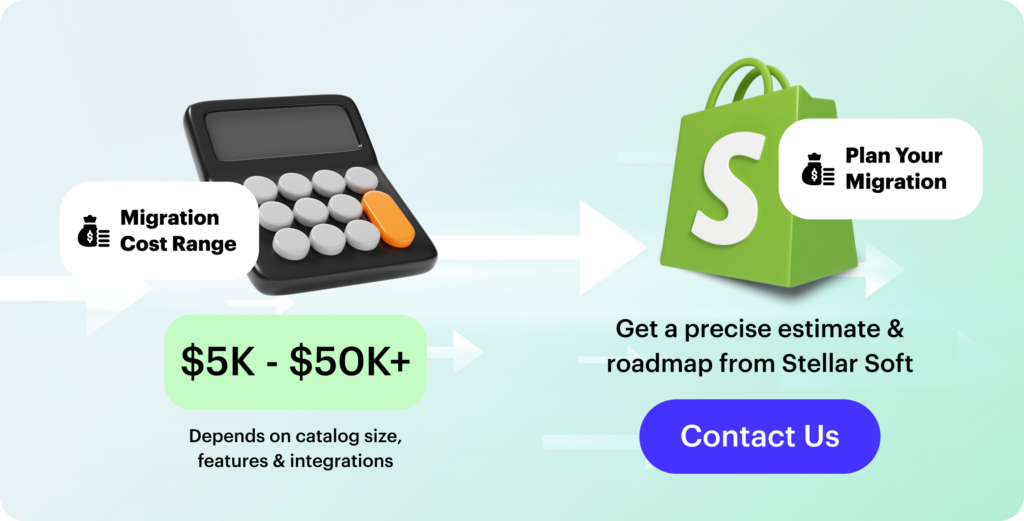
There is no single fixed price for a Shopify migration. One business may spend around $5,000, while another with a more complex setup can easily reach $50,000. The main factors include the size of the catalog, the number of custom features, the level of integration required, and how much cleanup or restructuring the legacy system needs.
The overall cost is heavily influenced by how many SKUs you have, how many product variations exist, how your collections are structured, and how much customer or order data needs to be transferred. In practice, merchants usually fall into several common scenarios:
- small stores usually face the lowest expenses, since the catalog is easier to clean up and there are fewer dependencies that could break during the move
- mid-sized stores often require a larger budget because of product relationships, inventory syncing, redirects, and metadata cleanup
- large stores tend to need specialized tools or professional support, especially when dealing with meta fields, bundles, advanced product logic, or multilingual content
A small shop with only a handful of products can sometimes manage the migration independently. But once you work with custom fields, outdated URLs, complex navigation structures, or thousands of product variations, the risks and time investment usually outweigh any savings from a DIY approach.
At Stellar Soft, we’ve helped organizations with eCommerce replatforming from Salesforce Commercial Cloud, Magento, and even obscure custom platforms without losing a single SEO position or disrupting a journey.
Common Challenges and How to Avoid Them
Most difficulties that appear during a Shopify migration come not from the platform but from the process around it. With the right preparation, nearly all of them can be avoided. In practice, teams usually run into a few predictable problems:
- many projects start with unclear planning, which leads to underestimated scope and missed steps; defining timelines, roles, and responsibilities early keeps the process under control
- messy or incomplete product and customer data often slows down or breaks the import; backing everything up, mapping fields carefully, and running a small test migration helps catch issues long before launch
- SEO problems can show up when URLs change or metadata gets lost; setting up 301 redirects, migrating all SEO fields, sending fresh sitemaps, and monitoring Search Console helps preserve rankings
- internal links and navigation paths may break during the switch; checking URL structures, reviewing main user flows, and running link-checking tools reduces post-launch surprises
- failed tests close to launch day usually happen because not enough testing was done earlier; running staging tests, involving different team members, and validating edge cases makes the rollout smoother
When planning, testing, and communication are handled well, the migration becomes far easier – faster to execute, cleaner to maintain, and much less risky for both your team and your customers.
Stellar Soft focuses on high-precision eCommerce replatforming from systems such as Magento, Salesforce Commerce Cloud, and bespoke builds. Our engineers manage every technological layer, ensuring that your transition to Shopify is smooth, stable, and well aligned with your operational and growth needs. We audit or replace third-party apps, maintain search visibility, and restore critical functionality without affecting customers or revenue.
If you’re thinking about migrating to Shopify or want to know how the process should go, our team is here to help. Contact us to discuss and design a move that improves performance, maintains data integrity, and positions your store to scale confidently.