Market changes, corporate requirements, and customer expectations all shift quickly. How can companies swiftly expand their brand to suit new demands as artificial intelligence (AI) develops quickly and staff are expected to accomplish more with less? With headless eCommerce AI integration, its adaptability and agility. We’ll explain headless commerce if you haven’t heard of it already.
What you should know is as follows.
Understanding Headless eCommerce with AI Integration
The need for headless commerce is growing. In the past 18 months, about 75% of consumers have altered their purchasing habits, and the majority intend to continue doing so. Customers want tailored experiences that change quickly, therefore businesses need to use flexible architectures that allow for quick modifications without interfering with backend operations.
Businesses like Amazon have already adopted headless commerce, delivering highly customized interactions through independent services and decoupled architecture. However, flexibility also brings complexity, which is why quality assurance (QA) is so important.
What is headless eCommerce?
Headless commerce, in its most basic form, is the division of the front and back ends of an eCommerce application. When the front and back ends of a platform function independently, modifications made to one end do not impact the other. This architecture gives brands the ability to create anything they desire. It makes it possible for brands to improve the purchasing experience.
The usage of eCommerce APIs, experience managers, and tools like Vercel and GraphQL, together with the significance of IT partners, are characteristics of headless. To engage consumers and remain ahead of their expectations, these materials are an essential component of any brand’s innovation strategy.
Headless integration vs. traditional integration
Your back-end logic and front-end experience are connected in traditional commerce architecture. For companies wishing to establish eCommerce directly, this type of architecture might be quite helpful. Setting it up is simple and quick.
Conventional eCommerce suppliers offer drag-and-drop storefront templates that facilitate the rapid launch of an eCommerce website. Nevertheless, this developmental strategy may negatively impact customisation and complicate the integration of new technologies.
In contrast:
- Conventional Integration: Any feature upgrade necessitates changing the entire system because the front-end and back-end are connected. This may restrict flexibility and hinder progress.
- Integration without a head: Headless systems, which are based on a decoupled architecture and communicate via APIs, maintain the independence of the front-end and back-end. This makes it possible for brands to grow into new sales channels and add new tools without any problems..
Therefore, headless integration provides the flexibility and scalability brands need to adapt, grow, and innovate, whereas traditional integration may be appropriate for smaller firms with simple needs.
Benefits & Risks
Unquestionably, the transition to headless commerce has benefits, but only if all channels function consistently. Here are the ways that headless commerce improves scalability, speed, and flexibility, along with the QA techniques that make sure these advantages don’t create new dangers.
| Vertical | Risk | Advantage | Outcome |
| Faster Time to Market | Frequent decoupled architecture releases increase the risk of regressions and integration mismatches between front-end and back-end services. | Independent front- and back-end deployments accelerate development cycles and enable faster iteration of new features. | Continuous integration (CI) and automated regression testing stabilize release velocity, ensuring reliability while maintaining agility. |
| Flexibility & Customization | Frequent UX experimentation can introduce inconsistent layouts, UI degradation, or broken front-end logic across frameworks. | Teams can freely swap frameworks, redesign experiences, and innovate UX without backend disruption. | Automated visual and functional testing ensures consistency and cross-framework reliability before production deployment. |
| Enhanced Scalability & Resilience | Microservices and eCommerce APIs introduce new points of failure, where untested dependencies can bottleneck under load. | Independent microservices scale elastically to handle variable demand and minimize downtime. | Proactive load testing and API monitoring detect bottlenecks early, optimizing performance and service uptime. |
| Omnichannel Consistency | Fragmented front ends across web, mobile, and IoT can create inconsistent experiences and desynchronized data. | A unified commerce engine enables consistent product, pricing, and customer data across all touchpoints. | End-to-end and cross-platform testing safeguard omnichannel cohesion and prevent data or UX fragmentation. |
| Personalization & Innovation | Dynamic personalization can lead to inconsistent logic or performance degradation at scale. | Real-time, AI personalization drives engagement and conversion through tailored experiences. | Automated A/B validation and UI testing verify personalization accuracy and performance across customer segments. |
| Increased Complexity | Distributed architecture adds multiple integration layers, increasing configuration and coordination overhead. | Modular components allow scalable innovation and independent system evolution. | Centralized test management and API test automation provide full coverage across layers, maintaining interoperability. |
| Multiple Integrations | New or updated third-party services may disrupt order processing, payments, or data synchronization. | API-first integration enables rapid adoption of specialized third-party tools. | Automated integration tests and monitoring ensure seamless data flow and stable third-party performance. |
| Consistent Customer Experience | Disparate front ends risk brand inconsistency and uneven performance across browsers or devices. | Centralized commerce logic ensures consistent brand presence across all interfaces. | Automated visual regression and performance testing uphold design integrity and responsiveness across environments. |
| Security & Compliance | Expanding API surface increases vulnerability exposure and compliance complexity. | API-based architecture enhances security isolation and data control when properly managed. | Automated security scans, penetration testing, and compliance checks maintain regulatory standards and protect data integrity. |
Unmatched flexibility, speed, and scalability are possible with a headless approach—but only if everything functions safely and smoothly. Businesses run the danger of uneven experiences, system breakdowns, slow performance, and security flaws if they don’t conduct thorough automated testing. Brands may expedite change while maintaining stability and security without raising operational risk by integrating test automation at the center of a headless commerce strategy.
AI use cases
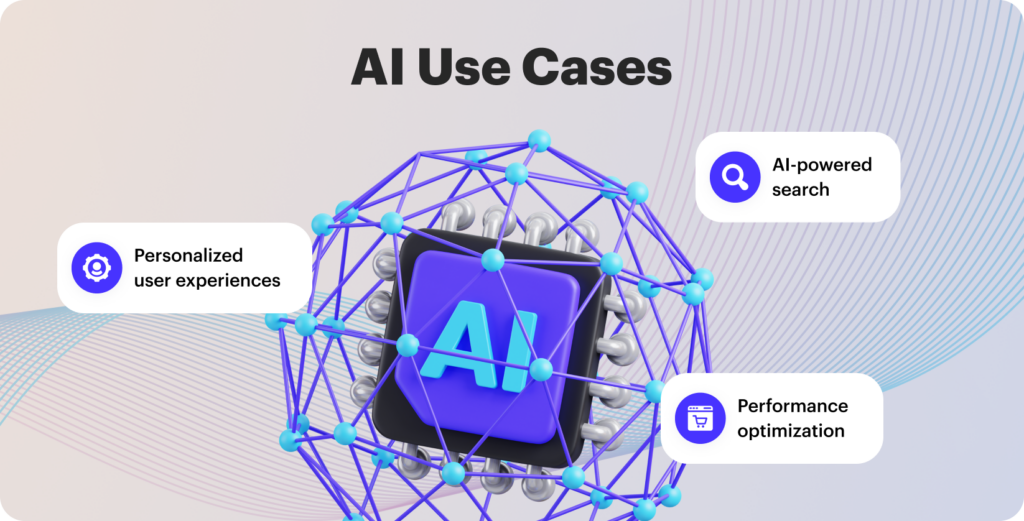
Leading eCommerce companies are utilizing chatbots or virtual assistants to increase customer retention, investing in real-time analytics to better forecast demand, and implementing AI-powered auto-suggest technologies to display results based on search intent. View:
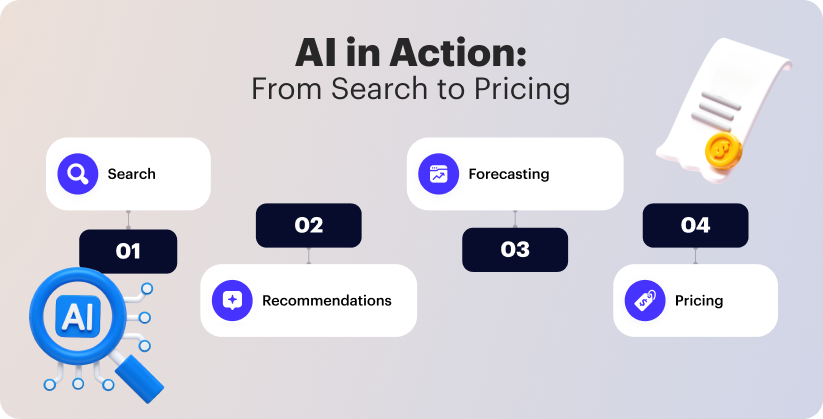
- AI-powered search: Headless eCommerce platforms can enhance consumers’ entire buying experience by using AI algorithms to deliver more precise and pertinent search results. AI-driven search algorithms are able to comprehend user intent, take user preferences and behavior into account, and provide tailored search results.
- Personalized user experiences: By examining user data, preferences, and behavior, AI enables headless eCommerce platforms to provide tailored user experiences. This increases engagement and conversions by enabling companies to give personalized product recommendations, tailored offers, and focused marketing efforts.
- Performance optimization: By automating procedures, forecasting consumer behavior, and improving product recommendations, AI can improve the performance of headless eCommerce platforms. Large datasets can be analyzed by AI algorithms, which can then find trends and make wise choices to enhance overall performance.
And that’s just the beginning of what digital shops can benefit from AI adoption. Businesses can quickly add the newest AI technologies to their backend by implementing a headless architecture, which will help them stay ahead of the competition and adapt to the ever-changing marketplace.
Tech Stack Overview
You are already familiar with the agony of navigating a maze of templates and plugins in order to implement a straightforward UX modification. By dividing your stack into distinct, loosely connected layers that communicate via eCommerce APIs, this architecture removes that friction.
Core Components
There are four main layers in the headless eCommerce AI integration, each with distinct roles and interfaces:
Commerce Engine (Backend)
All transactional business logic is handled by this central service, which exposes endpoints such as:
- GET /products/{id} retrieves product information, including pricing and inventories.
- GET /products?sort=price&category=shoes – Returns product collections that have been filtered
- POST /items/cart Products are added to shopping carts
- POST/checkout Orders with payment details are processed.
- GraphQL changes for intricate operations: place an order and apply a promotion
Each endpoint is framework-neutral and adheres to REST or GraphQL conventions with predictable replies.
API Gateway Layer
This layer, which sits between clients and the commerce engine, manages:
- JWT tokens with programmable expiration for authentication
- Role-based access constraints for authorization
- CORS regulations to permit only authorized sources
- Token bucket algorithms for rate limitation (X requests per period)
- Verify the request using schema definitions.
- Critical events (order.created, inventory.updated) trigger webhook dispatches.
By separating backend complexity from frontend usage, the gateway turns your commerce engine from a basic service into a powerful platform.
Frontend Clients
Different client implementations are powered by the same eCommerce APIs:
- React/Vue browser SPAs using client-side API calls
- Next.js SSR server-rendered apps for enhanced SEO
- Offline caching techniques in native mobile apps
- Lightweight API clients for IoT devices
Regardless of platform, all clients reflect the same business rules and data thanks to this uniform API contract.
Supporting Services
Enhancing the main engine of commerce:
- CMS for rich narrative (marketing content, product descriptions)
- Normalizing product data using PIM (Product Information Management)
- Order Management System (OMS) for workflows in fulfillment
- CRM for segmentation and customer profiles
Instead of forming a fragile monolith, these services create a modular network with defined interaction points by exchanging data across the API fabric.
Microservice Integration
You’ll probably move toward domain-specific microservices as your commerce platform grows. Rather of a single, cohesive commerce engine, you may break down into:
- Catalog Service: Product, category, and attribute management
- Costs Service: Managing tax computations, promotions, and dynamic pricing
- Inventory Management: Monitoring stock levels throughout fulfillment facilities
- Order service: Handling payments and client transactions
Through a single API gateway (such as the AWS API Gateway), each service exposes specially designed APIs while maintaining its own data store. By routing requests, translating protocols, and enforcing international policies, the gateway turns into your traffic control hub.
Robust observability is necessary for production-grade solutions. While centralized logging (ELK stack) and metrics collecting (Prometheus) offer insight into system health, distributed tracing with OpenTelemetry monitors requests across service boundaries. When downstream services deteriorate, circuit breakers (like Hystrix) quickly fail to prevent breakdowns.
Through serverless services and containerization (Kubernetes), this architecture expands horizontally, enabling individual components to scale independently according to their unique resource requirements and demand patterns.
Is headless right for your business?
From a growth perspective, strategists concentrate on how to advance the company. Your company’s demands will determine whether a headless commerce solution is appropriate for you.
Conventional eCommerce platforms were created with desktop computer users in mind. For instance, if you are a small and midsize firm (SMB) that would need more personnel or resources to create and manage a headless structure, a traditional platform would make sense.
In conclusion, given the growing prevalence of artificial intelligence and voice search integration, headless can provide a potent option for eCommerce companies seeking to future-proof their brand with more flexibility, scalability, and omnichannel capabilities.
Learn more about Stellar Soft’s headless solution
Flexibility and expense must be balanced when deciding whether to use a headless commerce strategy. Higher levels of customisation, scalability, and quicker user experiences are provided by headless solutions, but they also need more money and technical know-how.
As the eCommerce software development agency, Stellar Soft can handle all of your headless needs, regardless of your company’s needs. We provide everything an eCommerce company needs to fulfill standards and prosper in this dynamic sector, from integrating all of your systems to creating unique themes for your store. Get in touch with us right now to find out more.
The process is slow but Shopify’s support continues to make the lives of online sellers easier by enabling them to manage their operations seamlessly.
The personalized and consultative shopping experience that had been the domain of the upscale shops and online shopping was another aspect apart from the “smarter” product search. Witness this:
- The retail experience was already masked by AI and ChatGPT, and the customer was not obliged to accept the seller’s offers, as it changed from a one-sided communication to an interactive talk.
- Such intelligent assistance accelerated the selection process but also gave exact replicas of human responses that made the customer feel like their concerns were addressed thus providing comfort.
The customers have reached a stage where their needs are satisfied first and they expect the same from AI solutions; they not only desire the presence of AI in their operations but also, the use of AI as a supplement for the overall performance of their systems. The principal thought of eCommerce development 2026 is one of amelioration and hastening.
The Rise of AI-First Agencies in Shopify eCommerce Development
AI’s impact on eCommerce agencies’ performance isn’t the same for every agency. They all seem to point to the future where AI would need a huge effort. Surely the eCommerce sector would be the one to profit from that change, so only if you are ready to shift your methodology would you be able to make the most of it. Smart eCommerce agencies have always adapted to the extreme. With every new trend came the need to go through the learning process of new programming languages and we had to do that, great times for us.
Last year, only 68% of B2B (business-to-business) buyers were of the opinion that generative AI played no role in the B2B technology purchasing process. Now, 64% of executives are of the opinion that AI will have a noticeable effect on the future sales, thus disclosing this little secret. It is not yet another technology but artificial intelligence that has ever come to the heart of commerce technology, forming users to control their requirements.
The future of merchants will be greatly affected by AI indirectly through the phasing out of existing services and the ushering in of next-gen ones. Just picture the scenario where the consulting, integration, proprietary agents, and both merchants and tech companies that, if paired rightly, would be able to create, optimize, and even personalize their own solutions.
What is an AI-first agency?
To be clear, an AI-first agency Shopify is more than just a department that incorporates AI tools into its operations. It is where artificial intelligence of all kinds — such as Generative AI, etc. — forms the operational foundation and influences the development of services.
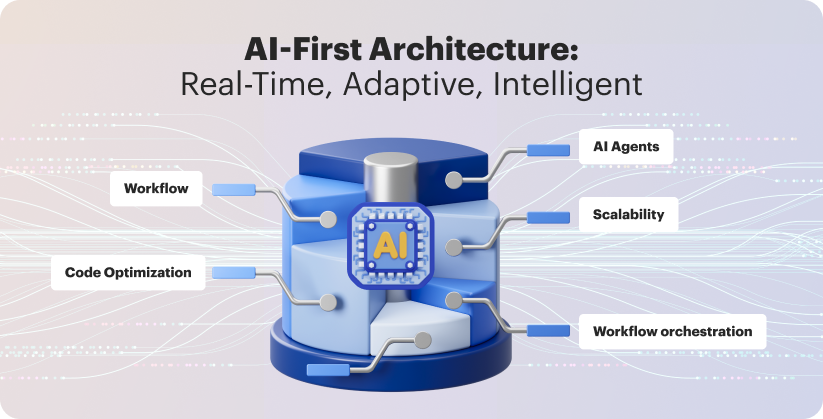
Smart eCommerce agencies re-architect workflows around intelligent agents that can execute and adapt in real time, as opposed to only depending on manual processes or passive automation.
These AI agents manage workflow orchestration, client reporting, content creation of all kinds, and campaign optimization. However, as the general public is already aware, “human teams” prioritize ethical oversight, supervision, and strategic direction.
Advantages of AI integration
In general, AI is integrated in eCommerce development 2026 because it is a technology capable of mimicking, augmenting, and in some cases exceeding human capabilities. Clients can utilize this feature to increase operational efficiencies, improve end-user experience and retention, and give them tools to improve decision-making speed and accuracy.
Intelligent content management
By automating the production, categorization, and optimization of product content, generative AI has the potential to completely transform content management. Generative AI can produce new content that is customized for each customer, in contrast to traditional AI, which evaluates and classifies already-existing content. Product descriptions, pictures, videos, and even interactive experiences are all included in this content.
Brands can provide high-quality, captivating content that appeals to their target audience while saving time and money by utilizing Shopify AI tools. Additionally, by ensuring that product information is correct, current, and conversion-optimized, generative AI may assist organizations in maintaining consistency across all touchpoints.
Smart search and recommendations
By offering users tailored, contextualized results that align with their tastes and intent, generative AI has the potential to completely transform search engines and recommendations. Generative AI can comprehend natural language and intent, in contrast to classical AI, which depends on keyword matching. This allows it to provide users with relevant results that are more likely to match their search queries. Brands may provide intelligent search and suggestion capabilities that improve the product experience and increase conversions by utilizing generative AI.
Demand forecasting
AI can forecast demand by evaluating past data, assisting companies in optimizing inventory levels and minimizing surplus, which lowers expenses and boosts productivity. Businesses can respond swiftly to shifting circumstances thanks to real-time inventory updates, which also enable efficient resource allocation and actionable insights.
Inventory transparency and order accuracy
Real-time visibility into every facet of the crucial order management workflow is offered by AI-powered order management systems. With the use of Shopify AI tools, businesses may proactively detect any disruptions and reduce risks. Customers can be more certain that their orders will be delivered precisely when and how promised because of this visibility.
Intelligent payments
For B2C and B2B customers making purchases in online stores, both traditional and generative AI improve transaction processes. Conventional AI streamlines operations and enhances customer experiences by optimizing point-of-sale systems, automating new payment methods, and enabling numerous payment options across channels. Additionally, the technology can offer tailored and smart financial solutions. Additionally, by developing dynamic and customized pricing methods, generative AI can improve B2C customer payments.
Compliance and data privacy
Traditional AI aids in transaction data security and automates payment regulation compliance throughout the commerce trip, allowing companies to swiftly adjust to new financial requirements and carry out continuous payment process audits. By creating predictive models that foresee modifications to payment laws, AI further improves these capacities. Additionally, it can automate complex data privacy procedures, assisting companies in effectively protecting client data and maintaining compliance.
Future of Shopify Development
All online retailers are experiencing higher returns when they use personalized commerce. According to Shopify research, for instance, brands who use a single platform see a 150% increase in omnichannel GMV growth, and AI-supported product recommendations and demand customisation result in shorter conversion cycles and higher order values.
Sustainability is becoming a crucial difference too. For instance, according to a recent study, 70% of customers wish to adopt even more sustainable behaviors, and nearly one-third of consumers practice six or more of them every day. This big shift also affects business-to-business transactions: half of buyers now give priority to sustainable suppliers, and in three years, that percentage is predicted to rise to two-thirds.
Sustainability analytics are being directly included into Shopify infrastructures by AI-first agency Shopify. These days, advanced data systems are able to predict supplier emissions, examine material data, and highlight low-impact products in storefronts. As a result, eco-conscious choices are integrated right into the purchasing process, creating a new category of data-driven sustainability.
Conclusion
The most effective B2B executives start with focused, goal-oriented use cases that work with their current systems. And the effects are genuine: AI powered development can improve every phase of the purchasing process, generating large-scale increases in efficiency and income.
However, a cohesive Shopify development strategy based on clean data, shared ownership, and distinct business results is necessary to fully realize AI’s promise. Get in touch with Stellar Soft to learn how top companies are making that transition and discover how your colleagues are overcoming obstacles to transform AI into a real growth engine.
The integration of intelligent build and test automation into the Shopify development life cycle, specifically in build orchestration, testing, and integration, allowed Stellar Soft to reduce the execution time by 50% while at the same time improving the platform’s reliability and scalability.
This AI eCommerce case study is all about the company’s successful use of AI in the domains of front-end rendering optimization, backend integration, and operational workflows in Shopify 2.0, thus leading to swifter deployments, lower maintenance costs, and considerable profit increase for a global fashion retailer.
How AI Helped Cut eCommerce Development Time by Half
Cultnaked is a sustainable fashion label that shines in the market for its eye-catching, top-quality garments. To go along with its luxurious appearance, the brand needed a brisk, reliable, and universally reachable online shop. The aspiration of Stellar Soft was to reconsider the foundation of the shop by migrating it to Shopify 2.0, boosting load speeds, and streamlining operations with advanced automation.
The major technical boosters were:
- Automated theme generation: Using internal scaffolding scripts based on Shopify Liquid templates, we generated reusable theme sections and components, reducing manual UI coding time by 45%.
- Integration orchestration: Automated monitoring and scheduling of the API integrations (Shopify, Klaviyo, Zapier, and Google Analytics) enabled the team to detect and resolve dependency issues before deployment.
- AI-powered performance testing: Automated test bots carried out concurrent load, cache, and network simulations in order to spot performance issues prior to the launch.
The team employed custom eCommerce development methods to switch contexts less frequently, test more areas, and loop through iterations quicker.
Project Background
Cultnaked’s old Shopify store was great looking but not performing well from a technical point of view. The website had the following problems:
- Very slow loading times: Customers often left the site before the homepage was completely loaded.
- Difficulties at checkout: The lengthy, multi-step process increased the rate of cart abandonment.
- Inventory and marketing changes required manual work which caused inefficiency in operations.
- Little automation: The marketing campaigns were unpersonalized and there was no behavioral retargeting involved.
The project was straightforward – to move to Shopify 2.0 and revamp the whole system to get quicker loading times and more reliable marketing and sales automation while still keeping up with the idea of Cultnaked’s eco-friendly premium brand.
The technology stack consisted of Shopify, JavaScript, Liquid, Nest.js, and Figma, which were all backed by GitHub Actions for continuous integration and deployment. The team composition includes: a) Technical Project Manager; b) Front-End Developers; c) Backend Developer; e) QA Automation Specialist; f) AI Automation Engineer — for AI workflow automation.
The hybrid cooperation framework between humans and AI made it possible to run the design, development, and testing streams simultaneously which resulted in shorter delivery cycles but still keeping code quality and UX fidelity.

AI Implementation
An AI-fueled tactic for agile eCommerce projects has been successfully embedded at three fundamental stages of the lifecycle of development: boosting the front-end effectiveness, bringing about back-end automation, and ensuring continuous optimization.
1. Front-End Acceleration
The team utilized a component generator, like TeleportHQ or Locofy.ai, which was specially trained on Shopify Liquid and Figma outputs. It turned Figma design tokens and layout grids into Liquid sections and JSON templates. The automation:
- Reduced manual front-end markup by 40%.
- Maintained pixel-perfect alignment between the design and the theme output.
- Enforced uniform schema validation across the custom components.
AI-based asset compression analyzed the visual and video assets during the time they were used and made changes to the compression levels in order to minimize the loss of quality. This approach led to a 28% decrease in the overall resource burden, yet the high-definition display standards were still met.
2. Back-End Automation
To tackle tedious backend integration problems, AI agents were included in the build pipeline:
- API Mapping: The developer mapping time was lessened, as the system performed the automatic matching of Shopify Products API endpoints to the inventory management logic through Swagger, a schema identification tool.
- Klaviyo’s email automation is powered by AI, which allows for consumer segmentation that varies according to engagement probability and retention scores, and changes of triggers based on the same factors.
- Zapier Workflow Optimization: By means of anomaly detection algorithms, redundant automations were identified thereby leading to a decrease in execution overhead and at the same time keeping synchronization reliability across CRM and analytics platforms.
Predictive conflict identification cut the backend integration time by 43% and the usual deployment rollbacks by 60%.
3. Continuous Optimization
AI is being utilized to its fullest potential through continuous performance improvements after deployment.
- Predictive Load Balancing: The system applied reinforcement learning models that were trained on data derived from traffic to monitor the volume of requests and switch cache settings accordingly.
- Automated Regression Testing: AI was able to conduct over 1,200 automated regression tests every night resulting in a test coverage of 92%.
- Data Analytics Enrichment: An AI-driven analytics dashboard summarized Google Analytics data to highlight trends and anomalies.
All these led to the development team being able to focus purely on high-value innovation as routine maintenance was a negligible cost. Predictive QA effectively reduced post-release problem volume by 36%, while proactive insights were able to cut short the typical sprint review time from 14 to 9.
Results & Metrics
The results encompassed noticeable performance advantages, hastening of the workflow, and better maintainability. AI augmentation had an impact on both technical and operational KPIs.
Main performance improvements:
- Development time sliced down to half owing to the use of automation and AI-based scaffolding.
- Page Load Speed: 35% enhanced, therefore, reached the worldwide load speeds of under 2 seconds.
- Checkout Optimization: Streamlined checkout flow and improved cart persistence led to a 25% increase in conversion rates.
- Operational Automation: Manual upgrades cut by 40% due to Zapier and Klaviyo processes and over 10 developer hours were saved weekly.
- Customer Retention: AI segmentation leading to personalized Klaviyo sequences resulted in a remarkable 32% increase in repeat sales.
- Data Accuracy: API schema validation showed 99.8% consistency between environments.
The achievements at the process level were:
- Complete automation of nightly build validation that included automated log analysis.
- There were 60% less occurrences after deployment due to the use of automated regression testing with anomaly alerts.
- AI analytics combined with sprint retrospectives provide a continuous feedback loop that is a basis for adaptive velocity optimization.
The integration of AI with standard Shopify development pipelines has been shown to enhance the technical aspects of this AI eCommerce case study i.e. speed, reliability, and scalability.
In other words, AI tools assisted rather than substituted developers. Through delegating the less critical tasks such as template generation, dependency resolution, and automated regression to the AI, engineers were able to concentrate on areas that required more human input, such as architecture, UX polish, and bespoke API logic, which resulted in output of superior quality in development time savings.
Key Takeaways
The Cultnaked case is an excellent example of the application of AI in eCommerce engineering workflows that can be scaled up. The major impacts are:
- Firstly, a front-end scaffolding that is powered by AI drastically reduces the time needed for Liquid and JavaScript theme creation and ensures that the designers’ intent is unchanged by the final product.
- Secondly, the implementation of a backend orchestration brings about the elimination of integration errors before the actual deployment hence leading to the less rework cycles.
- Thirdly, continuous AI testing and analytics will create a self-optimizing environment where performance insights will immediately influence sprint planning.
To sum up, these are the concepts that underlie AI-augmented commerce technology: reduced build cycles, more effective automation, and permanent scalability.
Cultnaked’s scenario offers a demonstration that AI is no longer an abstract concept but rather a powerful tool for eCommerce IT leaders. In all cases, smart tools are speeding up the time-to-market and are boosting the programmers’ productivity.

Transform your engineering workflows. Deliver more in half the development time savings, without sacrificing quality with Stellar Soft.
For more than ten years there has been no argument at all; the hosted eCommerce king is Shopify without a doubt. It acts as the supporting framework for eCommerce companies by the hundreds of thousands.
The topic of possible migration to a new platform is up for discussion among the participants. Then the question arises, what is Shopify really and how does this all-in-one platform expect to handle the global complexity of selling to the consumer in 2026?
The present study closely examines the matter of migrating to Shopify, the associated costs, the various steps and the duration for store setup thus revealing the importance of having the correct foundation for annual profits being even more critical.
Why Businesses Are Moving to Shopify in 2026
Shopify progressively turned into the premier eCommerce platform for sellers who demand a combination of a non-flexible, scalable, and not-so-tech-friendly solution. Over 40% of all new merchants are using Shopify, and the company also wins a third of all migrations from the corporate section to its platform. While Shopify is ideal for brands seeking simplicity and speed, businesses that rely on flexibility, multi-store management, and deep customization often find Magento or Adobe Commerce a more future-ready foundation.
The perception of Shopify has completely changed from what it was a couple of years ago or similar to the complex platforms where managing everything was a must. The infrastructural part is taken care of by Shopify. By providing hosting, security, and support that is operational around the clock, Shopify has done away with most of the scaling limits that were imposed by the legacy systems. The app ecosystem, theme versatility, and third-party connectors make it possible to build anything you can imagine.
Shopify accompanies businesses in their growth with solutions at every stage from quicker site and checkout conversion to facilitating headless architecture and multi-market selling. If businesses want to get free from their technical debts and have a say in their client experience, moving to Shopify has become a strategic choice rather than a technical problem. Discover the reasons for the migration to Shopify in 2026.
Shopify Migration Step-by-Step Process
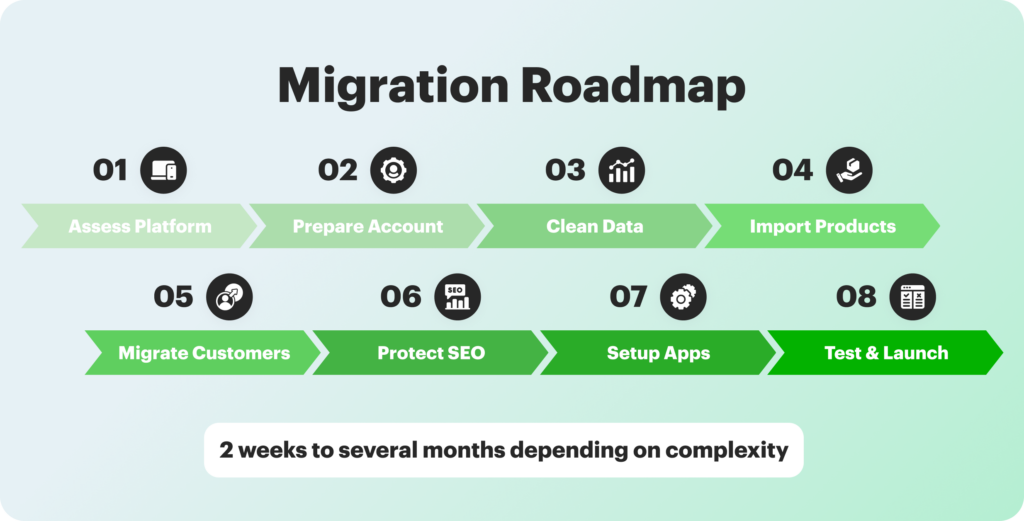
Migration between different platforms usually lasts for some 2 weeks up to several months which is determined by the complexity of the migration. Do not hurry it, as sauntered good things. The monthly fees from Shopify are just one part of the total costs you will incur, consider the migration tools, the designing work, the subscriptions, and perhaps the expert services. Your staff will need time to get used to Shopify’s interface and features. Thus, plan for training and adjustment periods to facilitate migration.
In fact, Shopify migration is not something that occurs once and then ignored. Your new webstore should be monitored and optimized regularly.
Assess Your Current Platform
Start by evaluating your current eCommerce platform from the technical and strategic aspects. Look into site performance, integrations, speed, and developers’ dependencies to locate the bottlenecks and recurring issues. Also evaluate the efficiency of the workflow and the limitations of the tools since these affect directly the feasibility and ROI of a Shopify transfer.
Analyze the customer experience, and in particular, the checkout process, mobile usability, and design flexibility. Look into the scaling requirements for large traffic and sales. This evaluation will help plan and also ensure that the Shopify adoption is in alignment with the company’s growth objectives.
Prepare Your Shopify Account
Select the appropriate Shopify plan (either Shopify or Shopify Plus) considering your site’s traffic, its complexity, and the functionalities you want to have. Set the basic configurations for the migration as per domains, business information, currencies, and tax defaults to have the systems synchronized first.
In case you are working with a migration partner, set up staging, template, and collaboration tools. Adequate account preparation not only eases the migration process but also minimizes the need to go backward, thus making it certain that the next import and configuration tasks are accomplished.
Clean and Export Your Data
Audit and clean up old product catalogs as well as order history. Old information will be cleansed of duplications and formatting errors to facilitate importing and to have data integrity in Shopify.
Core datasets, goods, customers, orders and content will be exported while taking care to keep key fields consistent. Any custom formats will be mapped to the Shopify structure with the use of tools. This step not only aims at improving data quality during its movement but also at making the business ready for operational efficiency.
Import Products and Collections
Importación de productos desde archivos CSV o API para catálogos enormes con características. Compruebe fotos, variantes, precio y metadatos después de la importación, luego use herramientas de edición masiva para arreglar rápidamente problemas.
Product collections migration by examining your category structure and mapping it to Shopify’s manual or automated collection logic. Keep SEO URLs with redirects and make sure that product collections are compatible with current buying trends and tagging standards.
Migrate Customers and Orders
Transfer and receive customer data including names, email addresses, purchase records, and marketing preferences. It is a must that passwords and credit cards that were used before are not included in the transfer thus making reactivation through branded invites and communication necessary. Bring in the past purchase records for analytical purposes but observe the limitation of managing live orders. If data migration needs to be maintained, think about the incorporation of the previous order data into business intelligence tools or data warehouses.
Protect SEO During Migration
Your task is to evaluate the existing SEO performance, and thus uncover the sites which will give you the most value, while at the same time, not changing the metadata, URLs, and content hierarchy. 301 redirects must be established for all of the existing pages and structured data must be checked to ensure that products, reviews, and breadcrumbs are visible.
In order to maintain authority, always keep an eye on performance rankings after Shopify store transfer and think of link building as a possible activity. Use analytics and crawling technologies to spot broken links, duplicate content, and redirect issues, thus minimizing traffic loss during the transfer.
Apps, Integrations and Advanced Features
Evaluate existing third-party tools and prioritize Shopify’s critical apps. Replace legacy third-party integrations with native applications or middleware to improve operational efficiency.
Configure APIs and connection platforms to ensure data integrity and automation in complicated workflows (B2B, ERP, multi-channel). Examine any Shopify connectors connected to your commercial website carefully to ensure functionality and synchronization after migration.
Design and UX Optimization
Choose or create a Shopify theme that is designed for performance, usability, mobile responsiveness, and conversion. Maintain SEO-friendly layouts while enhancing visual identity. Prioritize speed, accessibility, and conversion-focused design elements such as sticky CTAs, graphics, and mobile-first layouts. Maintain a consistent structure on ranking pages to ensure visibility.
Test Your Store Setup
Perform a soft launch on a restricted domain to validate all functions. Checklist items include checkout, payments, shipping, account creation, and application integrations. Conduct real-world order simulations, returns, and refunds to guarantee operational preparedness.
Test responsiveness, speed, and accessibility on several devices and browsers. Correct problems early on to reduce customer friction and improve the post-launch experience.
Cost Breakdown of Shopify Migration
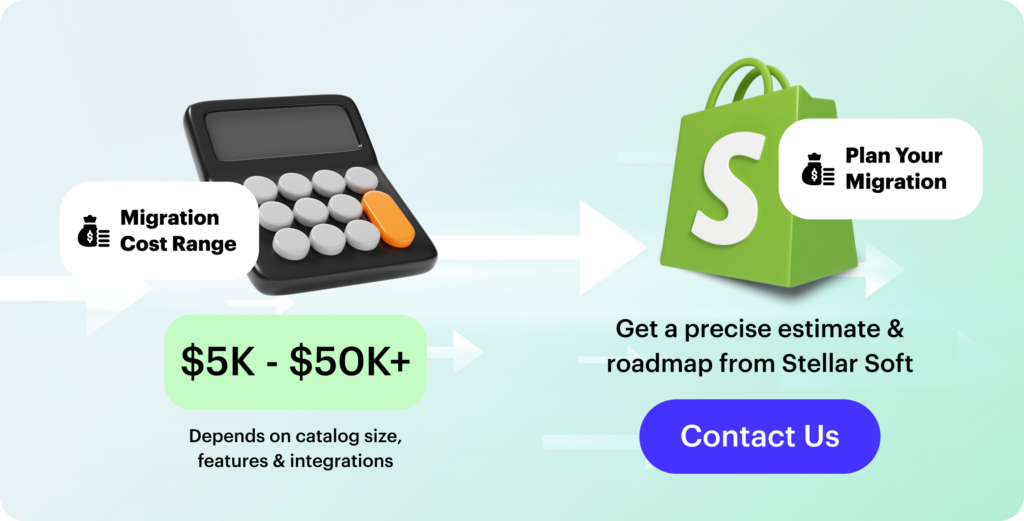
There is no single fixed price for a Shopify migration. One business may spend around $5,000, while another with a more complex setup can easily reach $50,000. The main factors include the size of the catalog, the number of custom features, the level of integration required, and how much cleanup or restructuring the legacy system needs.
The overall cost is heavily influenced by how many SKUs you have, how many product variations exist, how your collections are structured, and how much customer or order data needs to be transferred. In practice, merchants usually fall into several common scenarios:
- small stores usually face the lowest expenses, since the catalog is easier to clean up and there are fewer dependencies that could break during the move
- mid-sized stores often require a larger budget because of product relationships, inventory syncing, redirects, and metadata cleanup
- large stores tend to need specialized tools or professional support, especially when dealing with meta fields, bundles, advanced product logic, or multilingual content
A small shop with only a handful of products can sometimes manage the migration independently. But once you work with custom fields, outdated URLs, complex navigation structures, or thousands of product variations, the risks and time investment usually outweigh any savings from a DIY approach.
At Stellar Soft, we’ve helped organizations with eCommerce replatforming from Salesforce Commercial Cloud, Magento, and even obscure custom platforms without losing a single SEO position or disrupting a journey.
Common Challenges and How to Avoid Them
Most difficulties that appear during a Shopify migration come not from the platform but from the process around it. With the right preparation, nearly all of them can be avoided. In practice, teams usually run into a few predictable problems:
- many projects start with unclear planning, which leads to underestimated scope and missed steps; defining timelines, roles, and responsibilities early keeps the process under control
- messy or incomplete product and customer data often slows down or breaks the import; backing everything up, mapping fields carefully, and running a small test migration helps catch issues long before launch
- SEO problems can show up when URLs change or metadata gets lost; setting up 301 redirects, migrating all SEO fields, sending fresh sitemaps, and monitoring Search Console helps preserve rankings
- internal links and navigation paths may break during the switch; checking URL structures, reviewing main user flows, and running link-checking tools reduces post-launch surprises
- failed tests close to launch day usually happen because not enough testing was done earlier; running staging tests, involving different team members, and validating edge cases makes the rollout smoother
When planning, testing, and communication are handled well, the migration becomes far easier – faster to execute, cleaner to maintain, and much less risky for both your team and your customers.
Stellar Soft focuses on high-precision eCommerce replatforming from systems such as Magento, Salesforce Commerce Cloud, and bespoke builds. Our engineers manage every technological layer, ensuring that your transition to Shopify is smooth, stable, and well aligned with your operational and growth needs. We audit or replace third-party apps, maintain search visibility, and restore critical functionality without affecting customers or revenue.
If you’re thinking about migrating to Shopify or want to know how the process should go, our team is here to help. Contact us to discuss and design a move that improves performance, maintains data integrity, and positions your store to scale confidently.
Software development cost 2026 will still be the primary means through which businesses will be able to gain access to innovations, flexibility, and long-term ROI.
This comprehensive piece will outline not only the true cost of custom software development but also a step-by-step guide, primary advantages, and case studies. Everything you need for making the best technology selection for your company will be provided to you.
Key Factors Influencing Software Development Cost
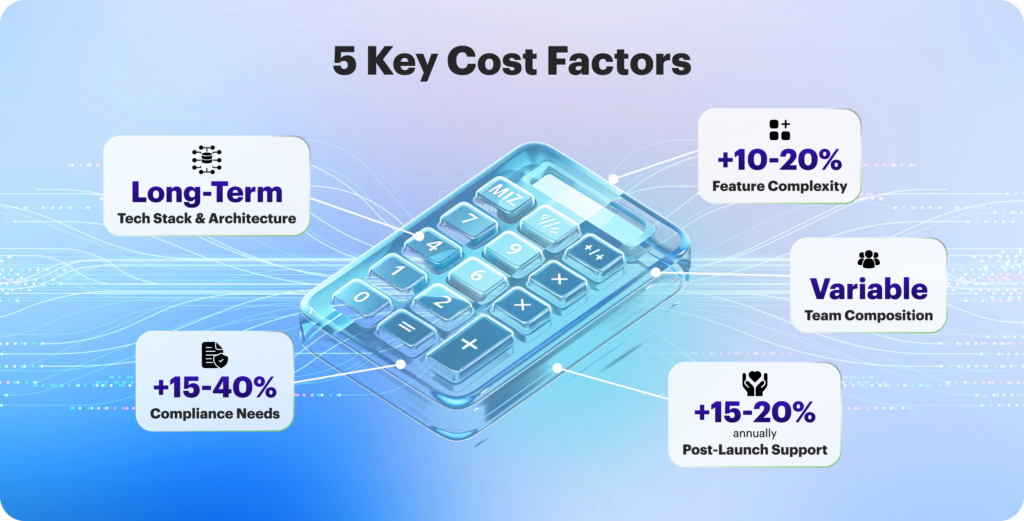
About 60-70% of the total budget is allocated to development directly. Still, the ultimate software development cost 2026 is not a straightforward reflection of the team’s hours worked. It varies with the product, the people, and the process. The main factors that determine the custom software cost are as follows.
1. Feature and UX Complexity
Adding any feature would mean more logic, testing, and edge cases to tackle. A straightforward booking process? Quite minimal. Then add multi-role dashboards, approval chains, and analytics. Your range (and budget) soon grows very large.
The same applies to design. Template-based user interaction is quite fast. Unique processes, dashboards, or components can indeed consume and to the extent that they offer functionality and how everything fits together the real motivator is the volume of design work.
That level of depth usually adds 10-20% to the total software project budget. What is the best way? First, get the essentials right. When your core functionality is up and running and people start giving feedback, it is a lot easier (and cheaper) to then expand from that.
2. Industry and Compliance Needs
Your environment determines how long it will take to meet security and regulatory requirements, with the most regulated or risky environment taking the longest (and getting the most testing). All the extra security and validation work takes about 15 to 40% more time than the standard testing scope at most.
If you are engaged in a highly regulated area, it is always advantageous to think of compliance and risk management early in the software development process rather than late when the product is almost finished.
3. Team Composition and Delivery Model
You can build your team in different ways — hire freelancers, assemble an in-house department, or work with an outsourcing partner. Each model gives you different levels of control, cost, and delivery speed, so the best choice depends on how your project is structured:
- an in-house team gives you the highest level of control and deep product familiarity, but it also brings the highest overhead: salaries, hardware, office space, and ongoing costs even during slow periods
- freelancers are usually the cheapest and most flexible option, especially for small, well-defined tasks, though you’ll spend more time coordinating their work and maintaining consistent quality
- an outsourcing company takes over both delivery and team management — you typically pay for development hours while getting a cross-functional team with structured processes, without committing to long-term employment costs
Seniority level is another factor to be reckoned with. Senior software engineers cost more on an hourly basis, but they can actually save you several weeks of redoing the work. We usually assemble teams that have the right mix of experienced, intermediate, and less experienced professionals.
The best configuration is defined by your objectives: speed, cost, and reliability do not always fit perfectly. Rather than concentrating on the hourly rate of the software developer, think of the worth you get for every dollar spent.
4. Tech Stack and Architecture
The development of tools and the establishment of the infrastructure will impact the custom software cost as well as the maintenance in the long run. The right technology stack selection is important, but the way you plan, screen, and run your project also plays a part in both cost and performance.
Common stacks like React, Node.js, Python, or .NET are liked by developers for their simplicity and for being a quick start, on the other hand, the professional techs like Rust, Elixir, or AI/ML are usually more expensive and time-consuming for the onboarding process.
The costs of operation are also determined by your configuration. A small application serving a couple of hundred users needs a little bit of cloud support compared to a very busy and data-hungry system. The recurring costs from third-party APIs (payments, analytics, or AI) may also rise with an increase in usage.
Consideration of architectural choices is important as well. A single monolith is quicker and cheaper to notice, but it is also very hard to extend later on. A modular or microservices-based architecture offers better scalability, but it also calls for a higher initial investment. The most favorable stack is one that is in harmony with the aspirations of the product, not what is trendy at the moment.
5. Post-launch Scaling and Support
When creating an app, the best outcome should be a bog-standard, fully operational, and fast product. This will encompass expenses for the cloud, monitoring of downtime, constant updates, fixing of problems, and technical support.
However, there are still a lot of teams that forget to allocate money for this item; nevertheless, it is usually around 15% to 20% of the initial annual expense. If you consider continuous support as a major factor of the product stabilizing, securing, and improving over time, then an MVP will turn out to be a long-lasting business.
Development Cost by Type and Region
eCommerce development costs increase with project complexity and system architecture. MVPs, or lightweight storefronts, custom software cost $50,000 to $100,000 and provide fundamental shopping functions, minimal integrations, and a semi-custom user interface. Scalable solutions ($100,000-$300,000) feature personalized UX/UI, modular or headless architecture, various integrations, and efficient infrastructure.
These ranges represent overall backend, frontend, API, QA, DevOps, and project management expenditures. Accurate project type classification promotes alignment with scalability, maintainability, and performance objectives, while minimizing scope creep and technological debt.
Europe vs USA vs Asia
Regional labor markets, hourly rates, and developer availability significantly influence software development costs. While exact pricing varies by project complexity, technology stack, and team seniority, several industry surveys highlight common cost patterns across regions.
- European development costs
According to multiple outsourcing market reports, Western Europe generally has higher average hourly rates than Central and Eastern Europe, largely due to labor regulations and higher operational overhead. In many surveys, the difference can range anywhere from 10% to 30%, though actual project totals vary depending on scope and required expertise. - United States development rates
U.S. engineering talent – especially senior full-stack developers and specialized eCommerce experts – tends to fall into the highest cost category worldwide. Many industry benchmarks indicate that U.S. rates may exceed Western European averages by 20% to 50% or more, depending on the specialization and market demand. - Asia and off-shoring regions
Numerous outsourcing studies indicate that development in Asia (India, Vietnam, Philippines, etc.) may be significantly more cost-effective, with project costs sometimes estimated 40% to 70% lower than in the United States. However, these savings vary widely depending on the provider, code quality, communication standards, and experience level – making careful vendor selection essential for complex or enterprise-grade builds.
Cost optimization in outsourcing necessitates weighing hourly rates against knowledge, while also assuring architectural rigor, modular design, and system performance. Strategic regional allocation, combined with rigorous vendor assessment, reduces risk while leveraging cost savings, allowing SMBs and businesses to complete large-scale eCommerce projects within established budgets.
Pricing Models: Fixed, Time & Materials, Dedicated Team
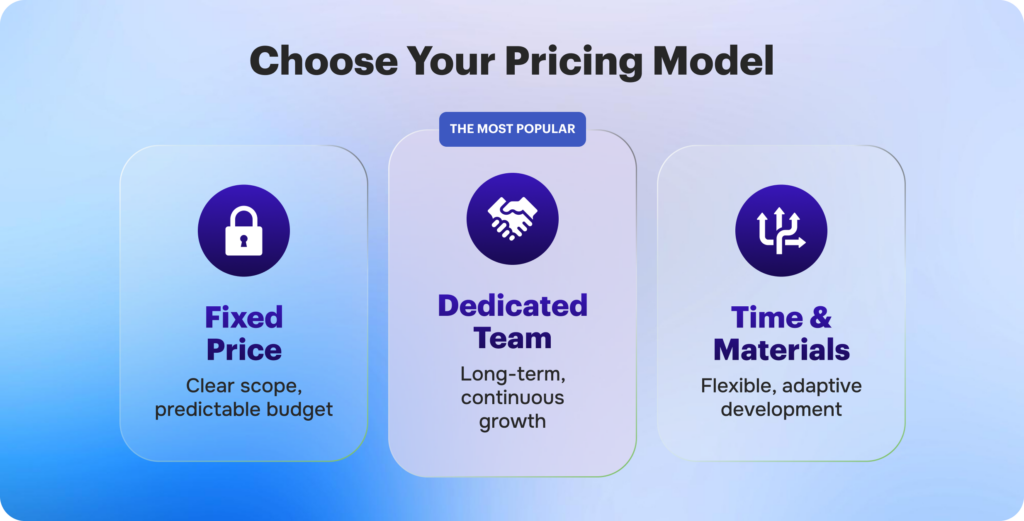
Where do you begin if you want to identify the best outsourcing vendor for your company or project? When looking through all of the different vendors, one of the first things to note is the business strategy used. Not all development pricing models are appropriate for your business or project. That is why, in this essay, we will go over the three main models to assist you find your match.
Fixed-price
A fixed-price model means the budget and deadline are agreed upon before the work begins. It works best when the project has clear requirements and a low chance of major changes.
Some practical advantages include:
- predictability – you know the total cost and delivery date from the start, so budgeting is easier
- clear expectations – the scope and timeline are defined upfront, reducing confusion later
- less day-to-day involvement – a project manager oversees the process and keeps everything on track
- great for smaller, well-scoped tasks where the feature set is already known and unlikely to shift
Time and Materials
The Time and Materials model works best when a project’s scope is likely to evolve or when it’s difficult to estimate the full workload in advance. You pay only for the hours and resources actually used, which keeps the process flexible and transparent.
Key advantages:
- flexibility – the team can adjust features, priorities, and workload as the project develops
- responsiveness – it’s easier to react to market changes or updates in your business strategy
- scalability – you can scale the team up or down depending on the current needs and budget
This model is ideal for long-term projects where requirements are expected to shift gradually and adaptability is essential.
Dedicated Teams
A dedicated team model provides you with full-time developers focused exclusively on your project, typically billed on a monthly basis. It works especially well for long-term initiatives where requirements evolve and continuity matters.
Key advantages:
- lower operational costs – recruitment, onboarding, and HR are handled externally, reducing your overhead
- better efficiency – the same team stays with the project, building familiarity and delivering faster, higher-quality results
- continuous development – it’s easy to scale the team, bring in specialists, or shift focus as the project grows
This model is the right fit for complex, specialized, or ongoing projects – particularly when your internal team lacks the bandwidth or specific expertise required.

How to Optimize Your Software Development Budget in 2026
To get the most out of your 2026 development budget, focus on disciplined planning, smarter resource allocation, and efficient execution. This means aligning every initiative with business value, leveraging automation where possible, and using flexible team structures such as blended or outsourced teams. Clear scoping, realistic forecasting, and long-term thinking help prevent overspending and keep projects on track.
Here’s what truly makes the difference:
- define value early – choose initiatives that have measurable ROI and support long-term growth, not just short-term fixes
- manage scope carefully – well-defined requirements at the planning stage help reduce unnecessary changes and avoid expensive rework later
- make ROI-based decisions – monitor performance throughout the project, use data to validate investments, and make sure each phase delivers real, trackable value
At Stellar Soft, we assist organizations in aligning strategy, technology, and resources to maximize ROI. From sketching MVPs and leveraging cloud or open-source solutions to designing scalable architectures and optimizing processes with AI and automation, our team makes every dollar work harder for your success.
Contact our specialists immediately to plan, prioritize, and carry out your 2026 development initiatives with confidence and efficiency.
Machine learning, natural language processing (NLP), and predictive analytics are used in AI-enabled stores so that they can keep learning from consumer interactions, sales data, and market trends, in contrast to traditional eCommerce platforms that depend on static rule-based systems.
Consider AI in online stores as environments where AI incorporates the context. Even just to give a product catalog, the AI store will actually change pricing, messages, products, and customer services on the basis of the user behavior. Here comes intelligence and automation combined: everything has to work in real time, scale at will, and serve customization. Could there be something more? Yes, the intelligent algorithms: from recommendation engines suggesting products tailored to the individual to chatbots responding to queries, to pricing algorithms reacting to demand changes in the market.
Why Traditional eCommerce Stores Are Becoming Outdated
Traditional eCommerce platforms were based on a “one-size-fits-all” architecture. Most of the product listings are static. A search result will depend on the keywords used, not the actual intent behind the search. The incidence of a client journey is sequential and rarely bends for specific preferences or habits. In the early part of the decade, such models would have sufficed; however, given the present competitive stage where customization and instant gratification are the orders of the day, these fall short in their application.
Consumers expect to get AI UX on the lines mentioned by Amazon, including context assistance, cart recommendations in prediction, and shipping information in a flash. Companies that continue to run static eCommerce websites will run the risk of going obsolete. McKinsey catalogued some of its benefits for AI personalization, saying it increases sales by 10 to 30 percent for digitally mature brands.
Getting new customers is becoming more expensive. Without the use of AI to enhance retention strategies like predictive churn alerts or intelligent re-engagement emails, brands will find it increasingly difficult to remain profitable. In such a setting, a static approach to eCommerce is not only suboptimal but a full-on liability.
AI Use Cases in eCommerce Websites
Similarly, building a purpose-built AI in online stores is no longer just a futuristic idea, but a necessity for competitive advantage. Integrated AI transforms a lifeless online storefront into a dynamic, living entity that continually interacts with data, learns from it, and evolves in parallel to business goals. No other technology delivers the differential advantage to online retailers in their quest to increase revenue per visitor, decrease operating and fulfilment costs, and improve Customer Lifetime Value.
Search and Product Recommendations
Why do so many people leave an eCommerce website after utilizing the search bar? The search feature in the majority of traditional retailers depends on exact keyword matches, which frequently fall short of capturing what the buyer is actually looking for.
Semantic search and intent recognition are made possible by AI. AI-powered search engines comprehend the meaning of the query rather than searching for specific text.
AI systems like Algolia or Klevu, for example, may understand a customer’s purpose when they put in a “lightweight laptop for travel” and present products with intelligent features like portability, weight, and battery life, even if the product descriptions don’t contain those precise terms. This lowers friction in the path to buy and significantly enhances product discovery.
Inventory and Demand Forecasting
Smart inventory management is another crucial area where AI excels. How can internet merchants steer clear of the two dangers of understocking and overstocking? Machine learning-powered predictive demand forecasting holds the key to the solution. By evaluating real-time variables like promotional calendars, customer sentiment, and even macroeconomic indicators, artificial intelligence (AI) goes beyond traditional demand planning, which is based on historical sales and seasonal trends.
By anticipating which products would be in demand at particular periods, down to the SKU and location, tools like Lokad, Inventoro, and Google Cloud’s demand forecasting technologies assist businesses in making accurate inventory decisions. As a result, carrying costs are decreased, stockouts are reduced, and fulfillment reliability is increased. Based on local purchasing patterns, AI may also help omnichannel firms optimize their warehouse distribution and replenishment cycles.
Fraud Detection and Dynamic Pricing
Real-time fraud detection is a significant advantage of developing an AI eCommerce store. Without interfering with valid transactions, how can a store spot fraudulent activity?
Anomalies in transaction behavior, such as mismatched IP addresses, abnormally high order values, or frequent repeat transactions, can be detected by AI systems that have been trained on large datasets. Machine learning is used by platforms such as Forter and Sift to detect and block fraud more accurately than rule-based systems, which lowers financial risk and chargebacks.
AI’s capacity for dynamic pricing optimization is equally potent. Conventional pricing systems frequently depend on seasonal updates and set criteria, which make it difficult to adjust to changes in market demand in real time. Artificial intelligence (AI)-driven pricing systems, such as Pricefx or Prisync, automatically modify prices in real time by analyzing inventory levels, rival prices, and product popularity.
How to Implement AI in Your Store
The multi-phase, intricate process of launching an AI-powered eCommerce business goes much beyond that of conventional eCommerce development. Every step needs to be carefully carried out, from testing and optimization to backend setup and AI integrations. This section, which is intended for companies looking to create an intelligent AI UX that is ready for the future, breaks the process down into seven distinct parts.
Set Up the eCommerce Infrastructure
Your user system, cart, checkout, order flow, and product catalog make up the core layer of your eCommerce platform. The first thing to consider is whether to create a custom solution or leverage an established commerce platform.
Key components to set up at this point:
- User account system with OAuth2.0 or JWT authentication
- Secure payment gateway integration (Stripe, Razorpay, or PayPal)
- SSL encryption and compliance for secure data handling
- CMS and product information management system integration
The infrastructure is designed from the ground up with security, scalability, and performance in mind.
Integrate AI for Product Discovery
Even if consumers are unsure of what to look for, how can they still find what they want? Semantic and visual search are the two main technologies that AI-powered product discovery uses to address this.
Natural language processing, or NLP, is used in semantic search to determine the purpose of a user’s query. It matches context rather than exact keyword matches. For example, even if the product title doesn’t utilize the precise terms, a customer searching for “durable running shoes for flat feet” will discover carefully chosen options with cushioning and arch support.
To implement this, your backend must include:
- NLP model integration (e.g., OpenAI’s GPT embeddings or BERT)
- Vector database setup to store product and query embeddings
- Real-time retrieval logic via APIs
Users can upload a photo and utilize visual search to identify related products. This allows users to shop using images rather than words, which significantly increases conversion for fashion, accessories, and lifestyle products. This feature integrates straight into the mobile app or search bar of your store and makes use of computer vision models that have already been trained on huge image datasets.
To ensure real-time performance under pressure, developers at Stellar Soft deploy these AI models using scalable microservices and integrate them via secure APIs. A natural, intuitive, and intelligent product discovery experience is the end result.
Implement Dynamic Pricing and Inventory Forecasting
Pricing and smart inventory optimization are two of the most potent uses of AI in business. However, how can one determine whether to increase prices or when to mark down stock that is soon to expire?
AI inventory forecasting also aids in avoiding overstocking and stockouts. ML models forecast future demand based on the following criteria rather than static reorder points:
- Seasonal patterns
- Campaign calendars
- Macroeconomic trends
- Product velocity and return rates
Depending on what best suits the company needs, our team uses gradient boosting, deep learning (LSTM), or time-series algorithms to create forecasting models. The entire supply chain planning process is automated by these tools, which interface with your ERP or order management platform.
Test, Monitor, and Deploy
Thorough testing and strategic deployment are the last steps prior to launch. How do you make sure that everything works perfectly in the actual world, including the AI models?
The QA procedure consists of:
- Functionality testing (for every AI and commerce module)
- Performance testing (page load, API response, scalability)
- Regression testing (to catch model errors after new data is introduced)
Post-deployment observability tools are set up to track conversion rates, AI model performance, API latency, and system health in real time. There are rollback methods in place to immediately undo modifications if something goes wrong.
An AI smart eCommerce launch initiates a cycle of continual improvement rather than ending with deployment. With Stellar Soft’s post-launch assistance, you can be sure that your platform will adapt to changing market trends, consumer behavior, and new data, making it smarter with each transaction.
Tech Stack Considerations
Your AI-powered eCommerce store’s success depends on selecting a tech stack that is scalable, adaptable, and specifically designed for AI integration—not just on excellent design or astute marketing. Your store’s speed, security, customisation options, and even the speed at which you can develop new intelligent features in the future are all impacted by this fundamental choice.
A React-based framework called Next.js is frequently the best option if speed and search engine optimization are your primary concerns. It is perfect for AI stores that require search engine visibility and depend on dynamic content and AI personalization because it supports server-side rendering (SSR), static site generation (SSG), and API routes. Next.js offers integrated routing, prefetching, and image optimization and integrates easily with headless CMS platforms.
Final Thoughts
A scalable, intelligent system that increases conversion, retention, and operational efficiency is the result of using AI, which calls for careful architecture, reliable data pipelines, and ongoing monitoring. From infrastructure and AI model integration to deployment and continuous optimization, Stellar Soft provides comprehensive AI eCommerce development solutions.
To begin transforming your eCommerce platform into a genuinely intelligent, revenue-generating machine, get in contact with us right now.
These systems must link front-end UX signals to backend fulfilment and data pipelines so that optimizations manifest as revenue rather than opinions.
Focus on modular data architecture, deterministic telemetry, and governance for any automation layer you deploy; without those, gains from automation and personalization will be inconsistent.
Design decisions must prioritize measurable conversion outcomes over aesthetic hypotheses. Each change should map to an experiment, a KPI, and a rollback plan.
Why eCommerce Best Practices Change Every Year
The cadence of change is driven by three vectors: platform compute and AI capability, consumer device patterns, and regulatory shifts. Each vector shifts what is feasible and what customers tolerate, so a static “best practice” becomes obsolete within months in high-growth sectors.
Adoption of agentic AI architectures has accelerated the rate at which new patterns appear, because these systems enable actions (not just suggestions) that alter customer journeys in real time. Operational readiness and data quality therefore determine who benefits and who is disrupted.
UX and Design Best Practices
UX must be treatable as software: instrumented, iterated, and aligned to conversion metrics. This means design tokens, component libraries, and analytics schemas that persist across releases and A/B tests.
Mobile-First Design
Mobile-first remains non-negotiable for the primary UX surface in 2026 because user sessions and conversion funnels increasingly begin on small screens. Design patterns should prioritise progressive disclosure, touch affordances, and critical-path minimization.
A mobile-first workflow requires early performance budgets and continuous usability testing on representative devices. That discipline reduces rework and prevents desktop-tailored decisions from degrading small-screen outcomes.
Clear Navigation and Search
Navigation and search are the operational heart of product discovery; ambiguity here imposes cognitive tax that kills conversion. Implement predictive search with relevance signals derived from behavioral telemetry and catalog analytics.
Search must integrate with personalization signals to reduce false positives and present the smallest set of high-probability SKUs first. Evaluate search effectiveness through CTR-to-cart and time-to-add metrics.
Performance and Speed Optimization
Page speed directly correlates with conversion and revenue; improvements in core web vitals consistently show measurable lift in engagement and transactions. Instrument load paths and prioritize Time-to-Interactive and Largest Contentful Paint as primary KPIs.
A recommended initial triage is to audit resource waterfall, eliminate third-party blocking, and enforce server-side compression and caching strategies. For Shopify stores specifically, platform-level optimizations and edge caching reduce origin load and improve global TTI; see our Shopify speed optimization service for implementation details.
| Area | Typical Impact | Quick Remediation |
| Third-party scripts | High latency, layout shift | Async/defer, load on interaction |
| Unoptimized images | Increased LCP | Serve AVIF/WebP, responsive srcset |
| Large JS bundles | Slow TTI | Code-splitting, tree-shaking |
| No CDN / poor cache | Geographic latency | Deploy CDN, set cache headers |
This table maps common failure modes to remediation patterns so engineers and product owners can prioritise work. Use it as a checklist within sprint planning and pair it with real user monitoring to avoid regressions.
Checkout and Payment Optimization
Checkout optimization is a systems problem that spans frontend UX, payment orchestration, fraud rules, and customer communications. Reduce friction by treating checkout as a mini-application with its own feature flagging and observability.
Implement these deliberate steps to reduce abandonment and recover revenue:
- Simplify form fields to only required inputs and support autofill standards.
- Offer local, mobile-friendly payment methods and network tokenization to reduce cart friction.
- Provide clear progress indicators and one-click flows for returning customers.
Integrate payment analytics into your revenue model and instrument drop-off points to generate actionable RCA tickets. Each bullet above should map to an experiment with a clear expected delta in conversion.
Personalization and Automation
Personalization in 2026 is multichannel, multimodal, and governed; indiscriminate personalization increases churn when it leverages stale or inconsistent data. Build personalization on a canonical customer profile and use confidence thresholds before exposing automated recommendations on high-value pages.
Practical implementation includes offline model retraining cadence, realtime feature serving for session signals, and fallback deterministic rules when model confidence is low. For engineering teams this means separate pipelines for feature computation, model training, and serving, with A/B controls around each.
- Prioritise high-impact touchpoints (homepage, product pages, cart) for model-driven content.
- Maintain deterministic fallbacks to preserve UX when models are unavailable.
Close the discussion by noting that personalization must be auditable: log inputs, decisions, and outcomes so you can diagnose bias, drift, and revenue impact.
Security and Trust Signals
Security posts are not optional content; they are conversion enablers when implemented visibly and correctly. Consumers must see and trust the mechanisms that protect payment and personal data, and engineers must ship minimal-privilege designs and tokenization.
| Trust Signal | Implementation Guidance | Why it Converts |
| PCI-compliant payment flow | Use hosted or tokenized checkout | Reduces perceived risk at payment |
| Visible data minimization notice | Inline, contextual explanation | Builds trust without compliance copy |
| Real-time fraud feedback | Adaptive risk scoring with manual override | Lowers false declines and preserves revenue |
Maintain a cadence of security reviews and tabletop exercises that include product, engineering, and legal stakeholders. Trust signals are worthless if they are not paired with operational readiness and rapid incident response.
Research Narration and Applied Evidence
Recent arXiv research demonstrates the efficacy of multimodal recommender systems and agentic conversational agents for eCommerce when they are integrated with strong data governance and latency-aware serving. These systems can raise engagement and CVR but require robust evaluation frameworks before production rollout.
Mobile usability studies also show a shifting landscape of interaction modalities, which validates the imperative for mobile-first patterns and accessible, AI-assisted interactions on small screens. Use these studies to set benchmarks for usability testing and to justify technical investment in adaptive interfaces.
Final Implementation Roadmap
Begin with an audit that maps UX journeys to business KPIs and telemetry. This audit should include a dependency graph of third-party services, critical resource waterfalls, and a prioritised backlog for measurable wins. Use that roadmap to scope short sprints that deliver both technical and product outcomes.
For platform-specific speed work, reference and integrate Shopify-level optimizations such as edge CDN rules and theme bundle splitting; our Shopify speed optimization offering can accelerate this work.
For broader architecture and platform builds, align your backlog with our eCommerce development standards and implementation templates to reduce integration risk.
If you need a practical implementation roadmap, an audit that maps engineering work to conversion lift, or execution support for personalization and checkout orchestration, contact Stellar Soft and request a technical assessment. We will produce a prioritized sprint plan that converts diagnostic findings into measurable revenue impact.
FAQs
What are the best eCommerce practices in 2026?
The best practices in 2026 are those that combine performance, governed personalization, and resilient checkout experiences into a single observable pipeline. They require modular data architecture, continuous measurement, and conservative rollout patterns for automated agents.
How to optimize an online store for conversions?
Target low-hanging technical debt first: reduce page load times, fix critical UX friction in the checkout path, and instrument user journeys to create testable hypotheses. Then apply model-driven personalization to high-impact touchpoints while continuously validating with experiments.
What UX elements impact eCommerce sales most?
Primary elements include page load performance, clarity of product information, trust signals in the checkout, and the relevance of search/recommendations. Combined, these elements determine the friction and the confidence a shopper has before committing to purchase.
Leading platforms now integrate fulfillment workflows with order management systems (OMS) and advanced forecasting models. Operational efficiency is driven by strict latency SLAs for both warehousing processes and last‑mile delivery coordination.
Order fulfillment eCommerce now requires end‑to‑end orchestration between digital storefronts, fulfillment centers, and carrier networks. Distributed inventory strategies optimize proximity to demand clusters while minimizing total delivery distance. This architectural shift reduces average delivery time and total logistics cost, influencing customer satisfaction scores.
In 2026, marketplace platforms incorporate fulfillment telemetry into performance KPIs for third‑party logistics (3PL) providers. These KPIs include pick rate, ship time variance, and delivery success rate for time‑critical segments. Enterprises that align fulfillment metrics with customer retention goals gain measurable competitive advantage.
Each of the components above, inventory location, carrier integration, and performance telemetry, must be engineered with precise protocol interfaces and robust fault tolerance. Integration protocols such as RESTful APIs, event streams (Kafka), and EDI still operate side‑by‑side in hybrid enterprise stacks. This system complexity requires disciplined architectural governance to maintain throughput as order volume scales.
What Is eCommerce Fulfillment?
eCommerce fulfillment refers to the technical and operational processes that begin when an order is placed and end when the parcel is delivered to the customer. It includes inventory receipt, storage, pick/pack operations, shipment processing, and returns handling.
At scale, fulfillment becomes less of a warehouse task and more of a systems engineering challenge. It requires reliable digital infrastructure, robust integrations between platforms, and well-designed workflows – often implemented through custom software development and tailored automation solutions.
Fulfillment is both a logistical and data problem: systems must synchronize physical actions with digital state updates in real time. Orders flow from eCommerce platforms into warehouse systems, shipping carriers, ERP environments, and customer notification services. Achieving this level of coordination typically requires structured system integration services that connect APIs, event streams, and databases into a unified operational pipeline.
In practice, successful eCommerce fulfillment depends on reliable warehouse management systems (WMS) that enforce location control, inventory accuracy, and task allocation. Modern WMS solutions integrate barcode scanning, voice picking, and automated guided vehicles (AGVs) to increase throughput and reduce errors. Building or customizing such systems often involves enterprise software engineering, backend architecture design, and scalable cloud deployment.
Beyond task execution, fulfillment platforms generate large volumes of operational data. Telemetry from picking speed, inventory movement, and delivery timelines feeds analytics dashboards and forecasting models. Organizations frequently rely on data engineering and analytics solutions to process these datasets, ensuring real-time performance monitoring and predictive workload balancing.
Advanced fulfillment networks also implement intelligent routing, dynamic batching, and demand forecasting. These capabilities are typically supported by AI and machine learning development, which enables more accurate demand prediction, anomaly detection, and route optimization.
Fulfillment must satisfy customer expectations for delivery speed and accuracy while minimizing operational costs. Customers increasingly expect same-day or next-day delivery, putting pressure on fulfillment networks to optimize routing, labor deployment, and distributed inventory placement. Supporting this level of responsiveness requires scalable cloud infrastructure and DevOps practices to maintain system reliability under peak loads.
As fulfillment complexity grows, companies invest in micro-fulfillment centers, autonomous sorting technologies, and real-time orchestration platforms. These environments require not only operational efficiency but also resilient architecture, secure data exchange, and continuous system monitoring – areas where structured engineering and integration expertise become critical.
Fulfillment Models Explained
There are multiple fulfillment models employed in eCommerce logistics, each with distinct architectural, cost, and operational properties. These models include in‑house warehousing, dropshipping fulfillment, hybrid fulfillment, and 3PL eCommerce outsourcing. Each model requires different integration patterns with order management systems and varying degrees of operational control.
In‑House fulfillment centralizes physical inventory in company‑owned facilities. It offers maximum control over order flow, quality assurance, and process optimization. However, it also demands capital investment in infrastructure and labor management systems.
Dropshipping fulfillment eliminates the need to hold inventory by having suppliers fulfill directly to customers. It reduces inventory risk but increases dependency on supplier performance and complicates delivery visibility. Dropshipping also requires robust exception handling and notification systems due to variable supplier SLAs.
3PL eCommerce outsourcing delegates fulfillment operations to specialized logistics partners. These partners typically provide multi‑site warehousing, pick/pack services, and carrier negotiation. Integration with 3PLs demands secure API endpoints, real‑time status callbacks, and standardized data interchange protocols.
Hybrid fulfillment combines internal resources with 3PL partnerships to balance scale and control. Hybrid approaches often retain strategic SKUs in company facilities while outsourcing long‑tail SKUs to 3PL partners. This model simplifies seasonal demand scaling without large fixed infrastructure costs.
Below is a table that compares these models across key operational dimensions relevant to fulfillment decision-making.
| Fulfillment Model | Inventory Control | Integration Complexity | Operational Cost Profile |
| In‑House | High | Medium | High fixed, low variable |
| Dropshipping Fulfillment | Low | High | Low fixed, moderate variable |
| 3PL eCommerce | Medium | High | Low fixed, moderate variable |
| Hybrid Fulfillment | Medium‑High | Very High | Mixed cost structure |
Each model must be evaluated against corporate objectives and throughput targets. Technical teams must architect fulfillment integrations that allow switching or scaling of models over time.
Costs of eCommerce Fulfillment
Understanding the costs of eCommerce fulfillment is critical for financial planning and pricing strategy. Fulfillment costs include warehousing, labor, packaging, transportation, returns processing, and technology licensing. Each cost category contributes differently to the total cost of goods sold (COGS) and margin erosion.
Warehousing costs encompass facility lease, utilities, rack space, and equipment depreciation. In distributed inventory strategies, warehousing costs scale with the number of fulfillment centers and proximity to demand clusters. These costs are often measured in $/ft²/month and vary widely depending on geographic location and labor market conditions.
Labor costs include pick, pack, and sort operations, often priced per pick or per hour. Advanced automation such as robotics reduces per‑unit labor cost but introduces capital expenditure and maintenance overhead. Labor scheduling systems must optimize resource allocation to reduce idle time and peak overload.
Packaging and materials costs are line‑item charges for boxes, cushioning, labels, and protective materials. Materials cost influences both unit economics and sustainability metrics. Optimization engines that recommend packaging size per SKU can reduce volumetric weight charges from carriers.
Transportation and shipping costs dominate total logistics expenses for many enterprises. These costs include carrier charges, fuel surcharges, and last‑mile delivery fees. Negotiated carrier rates and zone‑based charge optimization directly influence net shipping cost per order.
Returns and reverse logistics costs cover inspection, repackaging, restocking, and potential disposal or refurbishing of returned goods. Systems must classify returns based on condition and destination, triggering appropriate reverse workflows. Metrics such as return rate and average cost per return are key inputs to fulfillment cost models.
Below is a table that itemizes fulfillment cost categories and technical considerations.
| Cost Category | Key Technical Considerations | Impact on Unit Economics |
| Warehousing | Facility management systems, inventory accuracy | Increases fixed and variable cost |
| Labor | Workforce management software, automation | High variable cost without automation |
| Packaging | Package optimization algorithms, environmental compliance | Moderate cost, impacts weight charges |
| Transportation | Carrier APIs, route optimization engines | Major variable cost |
| Returns | Reverse logistics workflows, condition classification | Erodes margin if unmanaged |
Fulfillment cost analysis must inform pricing, promotion, and network design strategies. Engineers and operations planners should build cost simulation models that integrate these categories to forecast margin impact under varying demand scenarios.
Fulfillment Trends in 2026
In 2026, fulfillment trends emphasize automation, predictive analytics, and distributed logistics. Micro‑fulfillment centers (MFCs) located within urban zones reduce delivery time and transport cost. They operate with automated sortation and robotics systems that handle SKU velocity tiers efficiently.
Another trend is predictive workload balancing, which uses machine learning to forecast demand at SKU and node levels. Models trained on time‑series data and external signals like weather and macroeconomic indicators improve labor and inventory allocation. This predictive approach aligns with research on time‑series predictions in supply chain contexts.
Sustainability optimization is rising as a fulfillment KPI. Algorithms now recommend carrier selection based on both cost and carbon footprint, balancing delivery windows with sustainability goals. This trend influences packaging decisions and inventory location strategies.
Real‑time visibility across the fulfillment pipeline is now a baseline requirement. Customers expect order status updates with precise location and delivery time estimates. Fulfillment systems integrate telemetry from warehouse sensors, vehicle GPS, and carrier tracking APIs to generate a unified tracking view.
Collaborative fulfillment networks between retailers and 3PL partners improve capacity utilization. Shared warehousing and fulfillment pooling reduce idle infrastructure cost. These arrangements require standardized integration protocols and shared performance metrics.
The final bullet list identifies emerging technical capabilities shaping fulfillment workflows.
- Robotic process automation (RPA) for repetitive warehouse tasks, reducing manual error rates.
- Edge computing at fulfillment nodes to process telemetry locally and reduce latency.
The list above highlights key technical enablers that reduce cycle times and improve operational throughput. Closing this trends section, engineering organizations must evaluate these capabilities against cost, complexity, and ecosystem readiness.
Conclusion
In 2026, eCommerce fulfillment systems operate at the intersection of logistics, automation, and real‑time data orchestration. Fulfillment models and cost structures must align with business goals while satisfying customer delivery expectations. Technical leaders should prioritize architectural scalability, predictive intelligence, and performance telemetry to optimize fulfillment networks.
If your organization is evaluating eCommerce fulfillment strategies or needs expert guidance to implement integrated fulfillment systems with advanced automation, Stellar Soft is ready to assist. Our team specializes in architecting scalable fulfillment solutions tailored to enterprise requirements.
Contact Stellar Soft to optimize your eCommerce fulfillment infrastructure and reduce total cost of logistics while improving delivery performance.
FAQs
What is eCommerce fulfillment?
eCommerce fulfillment is the complete set of systems and processes that manage the lifecycle of an online order from purchase to delivery. It includes inventory handling, picking, packing, shipping, tracking, and reverse logistics mechanisms.
What fulfillment models exist?
Fulfillment models include in‑house warehousing, dropshipping fulfillment, 3PL eCommerce outsourcing, and hybrid fulfillment strategies. Each model has distinct integration requirements and cost profiles.
How much does fulfillment cost in 2026?
Fulfillment cost in 2026 consists of warehousing, labor, packaging, transportation, and returns processing components. Costs vary by geography, automation level, and carrier agreements; engineering teams should use analytical models to estimate total fulfillment cost accurately.
It utilizes real‑time data streams, behavioral signals, and AI models to refine eCommerce personalization far beyond traditional segmentation. This section articulates the operational benefits and concrete examples of systems that improve business outcomes.
The primary benefit of hyper‑personalization is measured uplift in conversion rates through more relevant content delivery. Data from operational systems shows that exposure to contextually relevant product recommendations increases click‑through rates and order values. For example, dynamic home‑page content that adapts to user history can drive 10-30% increases in key revenue metrics.
Hyper‑personalization also reduces customer churn by aligning product offers with observed preferences and predicted trajectories. An enterprise retailer using predictive models reported a 15% reduction in abandonment across high‑traffic segments within six months. These operational benefits are quantifiable and repeatable when properly implemented.
What Is Hyper-Personalization?
Hyper‑personalization is the real‑time adaptation of eCommerce experiences based on individual user data and context. Unlike basic eCommerce personalization, which uses static profiles or broad segments, hyper‑personalization applies algorithmic inference to produce individualized responses. It leverages multi‑modal data sources, transactional, behavioral, contextual, to refine the customer journey personalization continuously.
Technically, the core of hyper‑personalization is a real‑time decision engine that orchestrates inputs from recommendation systems, session analytics, and predictive models. These engines correlate patterns from previous interactions with probabilistic user models to select optimal content and offers. See foundational research on contextual bandits in web personalization, which offers insight into decision policies under uncertainty.
In practice, a hyper‑personalized eCommerce system might adjust messaging, prices, and product recommendations within milliseconds of a user action. This requires distributed data pipelines, low‑latency inference layers, and robust A/B validation frameworks. Hyper‑personalization is not a single tool but an integrated system of data capture, modeling, and delivery.
Difference Between Personalization and Hyper-Personalization
eCommerce personalization refers to tailoring user experiences based on aggregated category data and heuristic rules. It includes simple rule‑based content blocks such as “Customers like you also viewed” or “Top sellers in your region.” This form of personalization typically updates on a daily or session basis and does not incorporate real‑time contextual inference.
Hyper‑personalization, by contrast, uses AI personalization to model individual user states continuously and applies real‑time personalization to adjust interactions. It integrates machine learning predictions, behavioral vectors, and context awareness to produce granular experience adjustments. The result is highly specific content sequencing, which traditional eCommerce personalization cannot deliver due to architectural limitations.
Personalization generally operates on static segments defined by demographics or broad behavioral buckets. Hyper‑personalization uses dynamic user embeddings, predictive scoring, and decision‑level fusion across algorithms. This enables real‑time adaptation, such as recommending products based on the current session trajectory rather than historical profile alone.
| Dimension | eCommerce Personalization | Hyper‑Personalization |
| Data Usage | Batch historical data | Real‑time streams + historical context |
| Modeling Approach | Rule‑based, segmentation | ML inference, dynamic embeddings |
| Response Time | High latency updates | Millisecond‑level decisioning |
| Context Sensitivity | Low | High |
| Customer Journey Integration | Partial | Full, continuous process |
Hyper‑personalization requires specialized infrastructure and modeling expertise that differs significantly from traditional eCommerce personalization. Organizations must audit their data pipelines and processing latencies to qualify for true hyper‑personalization deployment. The distinctions above underscore why many enterprises treat these as separate stages in technical maturation.
Technologies Behind Hyper-Personalization
To enable hyper‑personalization, eCommerce platforms require a technical stack that supports real‑time data processing, predictive analytics, and agile deployment. At the core are streaming data frameworks like Apache Kafka and event tracking layers that capture every user interaction. These technologies replace periodic batch jobs with continuous ingestion, enabling up‑to‑the‑moment user state.
Machine learning models operationalize AI personalization by predicting next‑best actions and user intent. Models such as recurrent neural networks (RNNs), transformers, or deep factorization machines can encode sequential behavior and latent preferences. Research on sequential recommendation systems demonstrates performance gains from attention‑based architectures.
The inference layer must integrate with eCommerce APIs to serve personalized content without perceptible delay. Low‑latency model serving frameworks like TensorFlow Serving or ONNX Runtime are common in high‑throughput settings. These systems expose model outputs to frontend components, which then render the user interface dynamically.
Additional important technologies include:
- Session state stores that preserve context across multi‑page journeys.
- Feature stores that standardize and serve predictive variables to models.
Integration between these technologies must prioritize robustness and observability. Without proper monitoring and model validation, systems degrade and fail to deliver consistent personalized eCommerce experiences.
Real-World Use Cases
Real‑world use cases of hyper‑personalization span product discovery, dynamic pricing, and cart abandonment mitigation. Retailers implement AI personalization to reorder search results based on inferred purchase intent. This improves relevance and reduces search friction for complex catalogs.
In travel and hospitality eCommerce, systems adjust offers dynamically to match user context, such as travel dates, device type, and previous interactions. Hotels may surface specific room types based on predicted value maximization. Airlines apply real‑time personalization to ancillary offers, which increases attach rates significantly.
Subscription services leverage hyper‑personalization to adjust onboarding flows according to user behavior within the first session. Predictive churn models identify at‑risk users and trigger targeted incentives. These interventions improve long‑term engagement metrics and subscription renewal rates.
The bullet list below identifies notable benefits achieved in enterprise deployments:
- Reduced bounce rates through adaptive landing pages tailored to individual interests.
- Increased average order values via contextually relevant cross‑sell recommendations.
The list above demonstrates measurable gains from hyper‑personalized systems. Closing this subsection, these use cases illustrate the practical applications of advanced eCommerce personalization strategies in high‑performance digital commerce environments.
Final Thoughts
Hyper‑personalization is a proven advancement in eCommerce personalization strategies that materially improves customer engagement, conversion rates, and business outcomes. It requires a coordinated stack of real‑time data capture, predictive modeling, and decision orchestration technologies. When implemented with precision and adherence to data governance standards, hyper‑personalization transforms static eCommerce platforms into adaptive, intelligent systems.
For organizations committed to advancing their digital commerce capabilities, Stellar Soft offers enterprise‑grade solutions that implement scalable AI personalization, real‑time personalization engines, and strategic integration frameworks. Contact Stellar Soft to evaluate your current eCommerce stack and begin architecting a system capable of delivering truly personalized eCommerce experiences at scale.
Contact Stellar Soft today to optimize your eCommerce personalization strategy.
FAQs
What is hyper‑personalization?
Hyper‑personalization is a system‑level approach to customizing eCommerce interactions at the individual level using real‑time data, AI, and predictive modeling. It contrasts with rule‑based personalization by continuously adapting content and offers based on dynamic user state.
How does personalization improve conversions?
Personalization improves conversions by increasing the relevance of content and recommendations to the current user’s intent. Data‑driven matching between user preferences and product offers reduces friction and guides decision‑making, which elevates conversion probability. Empirical studies of eCommerce systems confirm that personalized product suggestions improve key performance indicators such as click‑through and purchase rates.
What tools enable hyper‑personalization?
Tools that enable hyper‑personalization include streaming data platforms (e.g., Apache Kafka), feature and model stores, machine learning frameworks (TensorFlow, PyTorch), and real‑time model serving infrastructures. Additionally, analytics platforms that support sessionization and behavioral segmentation are necessary to provide the contextual signals that drive individualized decisions.
Models trained on historical data may perform well in validation but diverge under live input distributions, leading to unpredictable errors and user harm. An audit validates assumptions and makes hidden risks visible before customers are exposed.
Organizations that skip audits typically discover failures through customer complaints or regulatory inquiries rather than controlled testing. The result is expensive remediation, lost trust, and operational disruption. Pre-launch audits convert guesswork into verifiable controls.
Common Reasons AI Products Fail in Production
A primary cause of failure is brittle assumptions about input data: sampling bias, label noise, or feature drift invalidate model behavior quickly. Models that do not tolerate minor shifts in input distributions will produce unreliable outputs when the environment changes. This is a systems problem, not only an algorithmic one.
Another frequent reason is insufficient observability and feedback loops. Teams release models without mechanisms to detect degradation, making silent failure likely. Lack of monitoring means that regressions are only visible after significant user impact.
Operational and engineering debt also drives failure. Machine learning systems accrue unique technical debt, entanglement between preprocessing, training, and production code, which increases maintenance cost and reduces agility. This phenomenon has been documented as a structural risk in production ML environments.
Human factors and organizational gaps compound technical faults: unclear ownership, missing runbooks, and absent incident escalation procedures turn recoverable anomalies into outages. Without defined roles and processes, small incidents become crises. Good governance prevents this escalation.
The Role of Quality Audits in AI Development
Quality audits serve as formal checkpoints that evaluate risk across data, models, and infrastructure. They codify acceptance criteria and verify that those criteria are met through reproducible tests and documentation. An audit enforces accountability across engineering, data science, product, and legal teams.
Audits also standardize documentation practices that accelerate problem diagnosis. Model cards and datasheets are examples of artifacts that capture intended use, evaluation results, and dataset provenance. These documents reduce misuse and inform decision makers about model limitations.
Below is a focused checklist of operational audit scopes that should be applied to any AI product before release.
- Data lineage and integrity: verify provenance, transformation steps, and checksum or schema validation across pipelines.
- Model validation and robustness: confirm cross-validation, calibration, adversarial testing, and out-of-distribution evaluation.
The checklist above is a minimal operational scope; each item should produce objective pass/fail signals and versioned artefacts. Closing this subsection, audits are only useful when their findings are actionable and assigned to owners.
Below is a second list that describes governance artifacts and processes every audit must check.
- Documentation artifacts: model cards, datasheets, training logs, and evaluation notebooks are present and versioned.
- Operational controls: runbooks, rollback procedures, monitoring thresholds, and incident SLAs are defined and tested.
Those governance items convert technical validation into operational readiness. Closing the governance subsection, missing artifacts often correlate with longer mean time to recovery after incidents.
Data & Model Validation Failures
Data validation failures are often silent and insidious because training datasets rarely reflect production variability comprehensively. Common manifestations include label drift, feature distribution mismatch, and missing upstream validations that allow corrupted inputs into training. Detecting these issues requires automated data-quality pipelines that compute distribution statistics, label stability, and schema drift continuously.
Model validation failures extend beyond conventional accuracy metrics and require scenario-based testing. Validate calibration, subgroup performance, and failure modes under perturbations and noisy inputs. Tools like model cards make these evaluations explicit and document performance across demographic and contextual slices.
Adversarial and stress testing must be part of validation to surface brittle decision boundaries. Inject synthetic perturbations, simulate downstream system failures, and test graceful degradation. If a model does not degrade predictably, it is not production-ready.
Security, Bias & Compliance Risks
AI products increase attack surface areas and regulatory exposure when security and compliance are not audited. Threat models must include model-specific attacks such as model inversion, membership inference, and prompt injection in generative systems. Absent mitigations, sensitive training signals and PII can be exfiltrated through model outputs or side channels.
Bias and fairness audits detect disparate impacts that standard metrics can hide. Dataset documentation practices such as datasheets and fairness audits provide quantitative measures of disparate error rates and disparate impact across protected groups. These practices are vital for both ethical and legal risk management.
Compliance validation must establish data retention policies, consent records, and auditable lineage for inferred attributes. Regulatory readiness requires mapping technical controls to legal obligations; without this mapping, an audit cannot certify launch readiness. Closing this subsection, security and compliance gaps are immediate blockers for production deployment.
How AI Audits Improve Product Reliability
Audits materially increase reliability by converting vague risk statements into reproducible checks, remediation plans, and monitoring commitments. They force teams to codify assumptions and prove them under testable conditions. The effect is a measurable reduction in incident frequency and severity.
The table below maps common audit domains to practical checks and expected outputs, enabling engineering teams to operationalize audit findings.
| Audit Domain | Concrete Checks | Expected Artifact |
| Data Integrity | Schema validation, missing-value ratios, lineage checks | Versioned dataset manifests, drift reports |
| Model Validation | Cross-validation, calibration, OOD testing | Evaluation reports, model cards |
| Security & Privacy | Threat model, access controls, PII masking | Security assessment, access audit logs |
| Performance | p95/p99 latency tests, throughput under load | Load test reports, autoscaling policies |
| Monitoring | Drift alerts, accuracy monitors, business KPI hooks | Alert rules, runbooks, monitoring dashboards |
Closing the table, these artifacts must be stored in a retrievable audit repository to support both operational decisions and external review.
The next table ties monitoring signals to automated remediation actions and human intervention thresholds that audits should validate.
| Monitoring Signal | Automated Action | Human Action Threshold |
| Input distribution shift | Capture data snapshot, raise alert, queue for retraining | Data scientist review within defined SLA |
| Accuracy degradation | Temporarily route to fallback model, notify engineering | Incident review, rollback decision |
| Spike in latency | Autoscale inference cluster, enable degraded mode UI | Ops investigation and performance tuning |
| Suspicious outputs | Quarantine sessions for manual review | Product/ethics review and patching |
| Security anomaly | Revoke keys, initiate forensic logging | Security incident response activation |
Closing this subsection, an audit validates that automated actions actually execute under test and that human escalation paths are exercised via drills.
Building Trustworthy AI Products at Scale
AI systems are valuable only if they operate reliably, safely, and within legal and ethical boundaries under live conditions. A structured quality audit reduces deployment risk by translating abstract hazards into verifiable tests, documented artifacts, and operational controls. Organizations that institutionalize audits reduce silent failure modes and accelerate safe innovation.
Adopt an audit as a continuous discipline: version artifacts, automate validation, and connect monitoring to retraining and incident response. Leverage community practices, model cards and datasheets, to make evaluation transparent, and incorporate research-grade drift detection and monitoring techniques to detect degradation early.
If your team needs a formal AI audit checklist, implementation assistance for data-quality pipelines, or a production-grade monitoring stack, Stellar Soft can design and execute a tailored audit program. Contact Stellar Soft to operationalize AI quality controls and reduce deployment risk before your next release.
FAQs
Why do AI products fail?
AI products fail primarily because assumptions made during development do not hold in production. Data drift, unvalidated models, poor monitoring, and weak operational ownership cause systems to degrade silently until failures become visible to users or regulators.
What causes AI-generated product issues?
Issues arise from low-quality or biased data, overfitted models, and insufficient testing across real-world scenarios. Additional causes include security gaps, unclear usage boundaries, and lack of feedback loops that prevent timely correction.
How does quality audit prevent AI failures?
A quality audit enforces systematic validation of data, models, infrastructure, and governance before launch. It identifies failure modes early, documents limitations, and establishes monitoring and remediation procedures that reduce incident frequency and severity.
What risks come from unchecked AI systems?
Unchecked AI systems introduce operational instability, legal and compliance exposure, and reputational damage. They can amplify bias, leak sensitive data, make unreliable decisions at scale, and become costly to correct once embedded in critical business processes.