
eCommerce developmentApp developmentCustom developmentHeadlessMigrationReplatformingConsultingWeb designUX/UI designIntegrationMaintenanceShopify developmentShopify Website Development ServicesShopify Store DevelopmentShopify Speed OptimizationShopify Plus Development CompanyShopify Theme DevelopmentProfessional Shopify App Development ServicesProfessional Shopify Migration ServicesExpert Shopify CRO ServicesShopify Website Design ServicesShopify Development CompanyShopify Theme Customization ServicesShopify IntegrationShopify Store SetupShopify Conversion Rate OptimizationCustom softwareSaaS Development ServicesBlockchain Development ServicesFinancial Software Development ServicesMVP developmentConsultingMobile appsWeb portalsAI softwareMagento developmentIT staff augmentationBeringCa'PietraCultnaked – Fashion StoreIntoSocialWorld Jewish Travel - AI AssistantCote&CielBiomaAfterCartHey HolyBears with benefitsVintage furniture sellerBaketivityStellar SEO AppKing of ChristmasChemist4YouEasy ToolErgoBabyRevenue ForecastingNLPG MasterbookSelena TitanNetparcelBeautyInsighterCopperMountainAI Call QA PlatformAlbertbowWorld Jewish TravelGolden State UrologyLGFG Fashion HouseGLOCK WatchesWhat Is Agentic Commerce? The Next Revolution in Digital ShoppingHow Much Does AI App Development Cost in 2026?5 Signs Your AI App Isn’t Ready for LaunchWhy Modern Consumer Brands FailFrom Store Staff to eCommerce Director: Scaling a Norwegian Denim Brand Globally

Escapure: Modernizing a Shopify Plus Theme Without Interrupting Sales

In Escapure’s Shopify Plus store, even a small catalog change could affect product variants, inventory, and product pages. We are rebuilding the theme step by step, without rewriting it from scratch. We have completed 128 tasks and are transitioning the storefront to reusable sections and metafields while the store continues to process orders.

Jack Ananchenko

Reviewed by: Jack Ananchenko, Co-founder, CEO

Nov 25, 202610 min read
GermanyGermany
Escapure: Modernizing a Shopify Plus Theme Without Interrupting Sales

Escapure

Pet Food · Consumer Products · D2C E-commerce

The Essentials

Shopify Development

Shopify Theme Customization

Shopify Integration

Shopify Speed Optimization

Ongoing Support

PM, 2 Shopify Developers, QA, CRO Specialist

18 months, ongoing

230,724 sessions in 2025, 75% mobile

Tech Stack

Shopify PlusLiquidMetafieldsKlaviyoShoplift

Pet Food Store on Shopify Plus: A Legacy Theme That Was Holding Back Growth

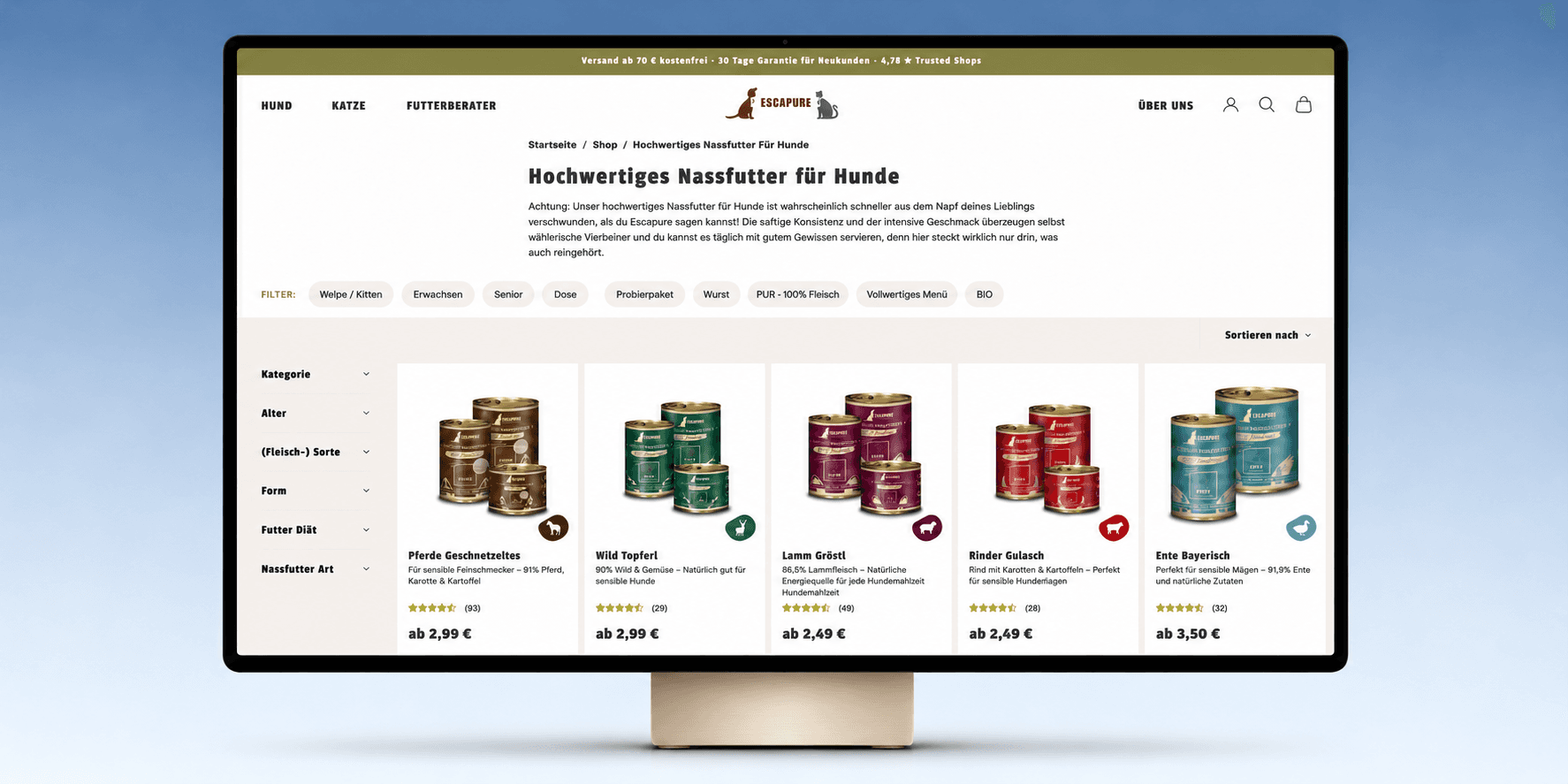
Escapure is a family-owned German brand that has been developing and producing its own natural dog and cat food since 2011. It sells directly through its online store and a network of specialized partners in Germany and Austria. Its product range includes dry and wet food, treats, chews, muesli, an organic (BIO) product line, supplements, and accessories. The brand focuses on natural ingredients, artisanal quality, transparency, and responsible production.

The store runs on Shopify Plus. In 2025, it recorded 230,724 sessions, of which 18,394 resulted in purchases. Annual gross sales increased by 73.5% year-over-year. Around 75% of sessions, or 173,600, came from mobile devices, making mobile storefront stability and speed a priority.


Legacy Shopify Code: Collection-Specific Templates, App Conflicts, and a Complex Mega Menu

When we joined the project, the store was already operating, and its architecture had evolved gradually. As new requirements emerged, developers added custom code, installed another app, or created a separate template. Each decision made sense on its own. Together, they resulted in a theme that was difficult to maintain and extend.

Here is what we found:

  • Extensive custom code in the theme, with some logic tied to menu structures, category names, and specific templates.

  • Sections built for a single collection or template. Reusing these blocks elsewhere meant rebuilding them from scratch.

  • Numerous third-party apps, some of which duplicated or conflicted with custom functionality.

  • Inconsistent approaches to product functionality: different templates, variants, metafields, and price display methods. Much of the functionality relied on metafields, manual configurations, and specific product structures.

  • Complex mobile navigation and mega menu.

  • Storefront performance depended on more than the theme itself, with third-party app scripts also affecting speed.

Why Modernization Was Needed: Scaling the Shopify Store Without a Complete Rebuild

Escapure needed to scale its store without rebuilding it entirely: launch new products, product lines, and categories faster; support different product page types; expand subscriptions and volume discounts; and improve mobile UX, Core Web Vitals, and SEO.

Each of these goals ran into limitations in a theme where changes in one area could affect another. Alongside new functionality, the client needed a more stable change management process and fewer errors caused by legacy code.

Catalog-related incidents further exposed how closely the store's components were connected: product updates simultaneously affected data exports and imports, variants, inventory, and product pages.

+73.5%

Gross sales

Before discounts and returns, 2025 vs. 2024

+69.5%

Total sales

After discounts and returns, same period

128

Completed tasks

Delivered while the store kept taking orders

The Challenge: Why Every Shopify Theme Change Affected the Catalog, Discounts, and Subscriptions

The main problem was straightforward: the legacy architecture was slowing down the store's development and turning every new e-commerce scenario into a potential source of regressions. In practice, even a minor change to the catalog or theme could affect several interconnected parts of the store. As a result, every release required careful coordination and extensive regression testing.

There were three underlying reasons for this.

Template-Bound Content

Individual sections and blocks were tied to specific collections, menus, or template structures. Launching a new collection required writing code, even when configuration changes would have been enough.

Code vs. Apps

Subscriptions, discounts, cart behavior, and performance depended on several systems at once. Changing one could affect how another behaved.

Inconsistent Product Structure

Different products used different templates, variants, metafields, and price display logic. This made both maintenance and testing more difficult: instead of testing a single scenario, each had to be checked separately.

Constraints: A Live Store, Shopify Checkout, and Third-Party Apps

  • The store cannot be taken offline. Escapure is an active e-commerce store, so a critical error in the storefront, cart, or discounts would immediately affect sales. The store must remain accessible during updates.

  • Within Shopify's limitations. All solutions must fit within the platform's architecture and checkout restrictions.

  • Some legacy code cannot simply be removed. Existing pages still depend on it, so old code can only be removed once everything that relies on it has been migrated to the new logic.

  • Third-party apps operate independently. They can modify the DOM, cart logic, and discount behavior, and the theme must account for these changes.

  • Subscriptions alongside regular product variants. Subscriptions must work with product variants, while volume discounts and subscription discounts must not conflict.

  • Two versions without compromising SEO. Mobile and desktop versions must work equally reliably, and changes must not negatively affect search visibility, schema markup, or Core Web Vitals.

The biggest challenge was updating these components incrementally in a live store while keeping checkout available.

Solution: Incremental Shopify Plus Theme Refactoring Without Interrupting Sales

The client wanted to scale the store without a complete rebuild, so we proposed modernizing it gradually, component by component, without rewriting the theme or rebuilding the platform from scratch.

The store had to remain accessible during updates, which meant keeping changes small enough to test each one independently.

After the audit, we stabilized critical workflows. We then began refactoring the theme in stages while simultaneously developing new features and improving UX, performance, and technical SEO. Every update was tested on a staging theme before going live. We remove legacy code only when nothing depends on it anymore.

Scope of Modernization: Reusable Sections, Metafields, Product Pages, and Mobile Navigation

  • Legacy code and integration audit. During the audit, we identified dependencies between the theme, catalog, discounts, subscriptions, and apps, prioritizing issues that could disrupt sales.

  • Product, variant, and inventory stabilization. We first fixed the workflows affected by the catalog-related incidents.

  • Reusable sections and blocks. Instead of sections built for specific collections, we introduced components that can be configured in the Theme Editor.

  • Content managed through metafields and theme settings. Logic previously embedded in template code is now controlled through data.

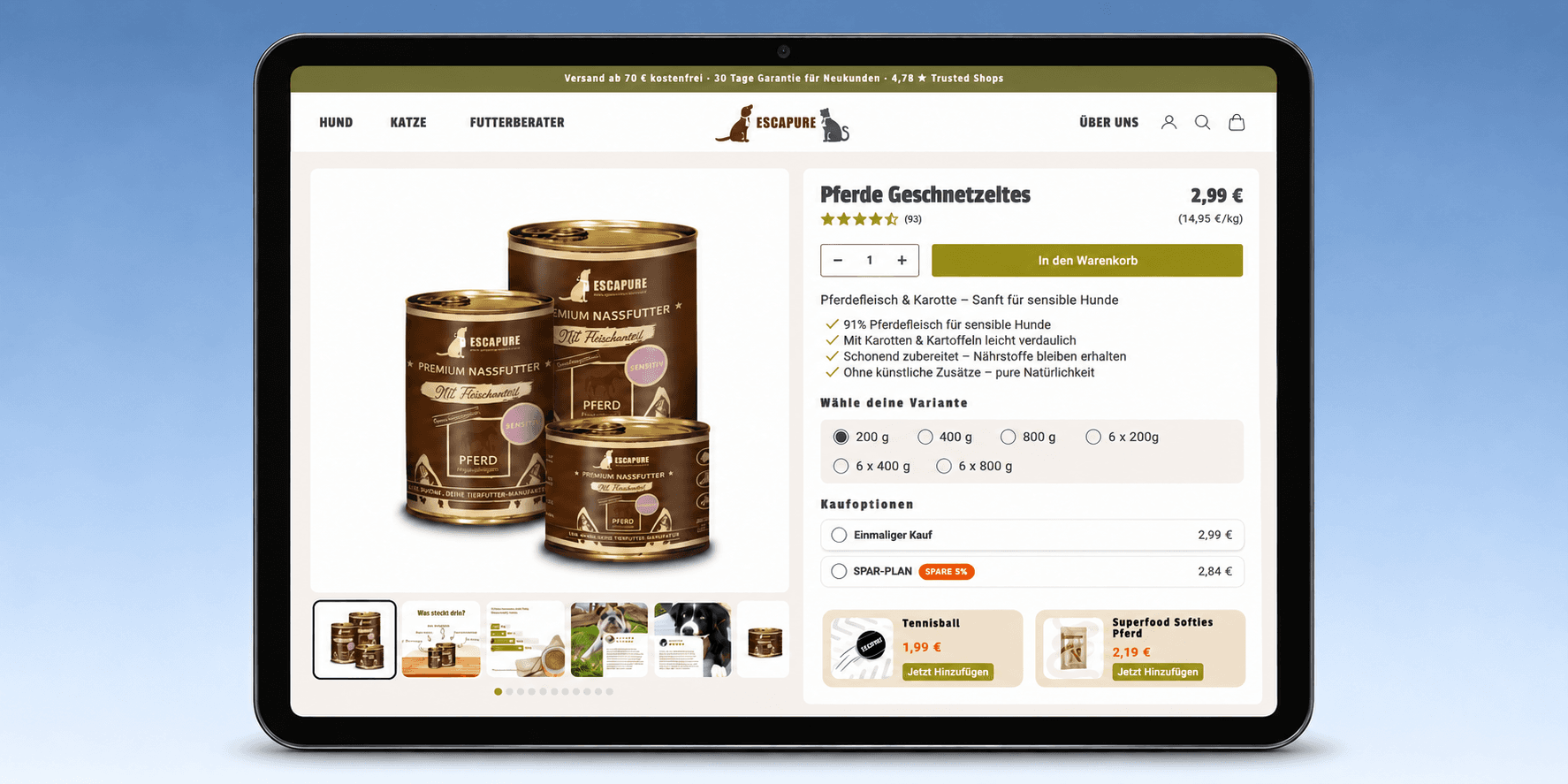
  • Product pages for one-time purchases and subscriptions, supporting product variants, volume discounts, and promo codes.

  • Improved mobile navigation and mega menu.

  • Core Web Vitals optimization and technical SEO.

  • Third-party app integration testing.

  • Enhanced QA and controlled deployment through a staging theme.

Shopify Legacy Theme Refactoring in Practice: Collections, Mega Menu, Subscriptions, and Mobile UX

The work covered critical bug fixes, performance optimization, UX improvements, new feature development, third-party app integrations, discount logic, SEO, and data imports. Below are several tasks that illustrate why standard solutions had to be adapted to this store's specific logic.

First Step: Stabilizing the Catalog, Variants, and Inventory

We started by fixing critical errors and stabilizing the catalog, including products, variants, inventory, and product pages. Until these workflows were reliable, any refactoring around them would only have introduced additional risks.

Task #1: From Page-Specific Templates to Reusable Sections and Metafields

Initially, new features had to be integrated into the existing theme as it was. However, sections were tied to specific templates, collections, menus, and product settings, so each new feature required manual configuration and often custom code for a particular page.

We gradually began moving content logic out of templates and into sections, blocks, metafields, and theme settings. A component no longer needs to know which specific page it appears on. It retrieves data from its settings and can be reused wherever needed.

Task #2: Multiple Blocks for Different Collections in a Single Shopify Template

The original logic was straightforward: one block for each collection. When several such blocks were added to a single template, the storefront could display only the first one and ignore the rest.

We linked blocks to collections through the “Select the collections to display” setting. The theme now identifies the current collection and displays the corresponding block. If no matching block exists for the collection or the setting is left empty, the theme displays the first block.

For the content team, this means a single template can now serve multiple collections.

Task #3: Duplicate Categories and Incorrect Category Mapping in the Shopify Mega Menu

The Main category logic worked correctly in the standard menu. In the mega menu, however, it could create duplicates or incorrectly map fourth-level categories.

We developed separate matching logic for the mega menu. A new block is assigned to the mega menu section whose parent category name matches the Main category value. This eliminated duplication and corrected the mapping of fourth-level categories.

Task #4: Subscriptions, Volume Discounts, and Promo Codes Without Shopify App Conflicts

Escapure's product pages must support several scenarios simultaneously:

  • One-time purchases;

  • Subscriptions;

  • Product variants;

  • Volume discounts;

  • Promo codes.

Several Shopify apps affected the product form, cart, and pricing simultaneously, creating a risk of conflicts between discounts.

We first examined what each app could handle at the integration level and separated subscription and non-subscription scenarios. We then evaluated each part of the logic individually to determine what should remain within the apps and what required custom code in the theme.

Task #5: Sticky Add to Cart, Mobile Navigation, and Mega Menu on the Same Screen

On mobile devices, navigation, the mega menu, Sticky Add to Cart, the back-to-top button, and other related components all operate within the same screen. They conflicted with one another and sometimes overlapped key shopping actions.

We coordinated their behavior so they no longer interfere with one another or cover buttons needed to complete a purchase.

Compatibility Layer in the Shopify Theme: Shared Rules for Products, Collections, and Navigation

Instead of continuing to accumulate code for individual templates, we built a custom compatibility layer within the theme: reusable sections and blocks, collection-based content mapping with fallback logic, and separate purchase scenarios.

Two parts of this layer are not covered in the examples above. The first is variant-level data synchronization: when customers switch product variants, the product and its price are displayed correctly. The second is metafield-based price display logic.

New business requirements can now be addressed without creating another template or installing another app. In most cases, configuring existing components is enough.

LayerStack
Platform and FrontendShopify Plus, Liquid, HTML5, CSS/SCSS, JavaScript, Metafields and metaobjects
Commerce and IntegrationsKlaviyo, Shoplift
Analytics, CRO, and PerformanceGA4, Google Tag Manager, Microsoft Clarity, Shopify Analytics, Core Web Vitals, Google Lighthouse / PageSpeed Insights

Shopify Store Modernization Results: Sales, Customers, and the Escapure Team

Sales in 2025 Compared to 2024

  • Gross sales: +73.5%.

  • Total sales: +69.5%.

  • Net sales: +62.9%.

For Customers: Accurate Pricing, Relevant Collection Content, and a User-Friendly Mobile Storefront

  • Products and prices display correctly when switching between variants.

  • A separate block can be configured for each collection within a shared template.

  • Fixed duplicate categories and incorrect fourth-level category mapping in the mega menu.

  • Mobile components no longer obstruct key shopping actions: Sticky Add to Cart, navigation, and the back-to-top button no longer interfere with one another.

  • Improved page loading speed and technical SEO.

For the Escapure Team: New Scenarios Through the Theme Editor Without New Templates

  • The content team can configure sections, collections, and product page scenarios independently through the Shopify Theme Editor, without developer assistance.

  • New product and collection scenarios can be launched without creating new templates, using existing reusable components and metafields.

  • Less repetitive code. Fallback logic and reusable components have reduced the need to write similar code for individual cases, while also reducing manual administration.

  • Lower risk of costly incidents because changes are tested before the theme goes live.

Stable Releases: Staging Theme, Regression Testing, and Git

Following the catalog-related incidents, we stabilized critical workflows: products, variants, inventory, and product pages. We added safe fallback behavior for collection content, variant metafields, and navigation logic: if a setting is empty or no match is found, the theme displays a fallback option.

We test every update on a staging theme, including regression testing. Git maintains a history of changes.

  • linkedin
  • x
  • facebook
  • Clutch
  • Upwork
  • Reddit

Does Every Theme Change Put Your Shopify Sales at Risk ?

We'll examine how your theme, catalog, and apps interact and propose a step-by-step modernization plan for your store.


Jack ananchenko

Jack Ananchenko

CEO and Co-founder

Vladimir gubarev

Vladimir Gubarev

COO and Co-founder

By submitting this form, you agree to our Privacy Policy and Terms & Conditions.

How We Can Help You

See What Else We've Built